
You must unlock the Just Control Configuration window and stop the channel(s) to be able to make any changes.
This tab allows you to configure the automatically generated As Run-Log File. It updates every time an element in the Video track has finished.
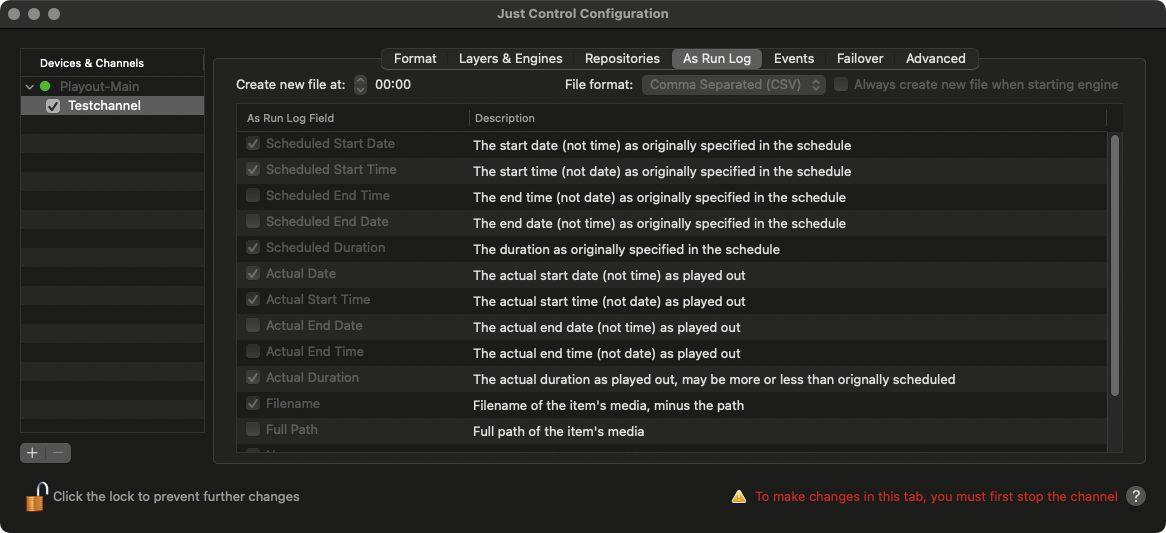
Create new file at: Defines the point of time when a new log file is being created.
File format: By default, the log is saved as CSV file in UTF-8 encoding. This means that all Unicode characters are logged properly. Optionally you can also save the log file in Fixed Width Column format.
Always create new file when starting engine: When enabled a new log file is created every time Just Out is (re)started.
As Run Log Field: Defines the data which will be stored to the As Run Log file.
The UID’s are replaced and not taken over from the existing playlist in the following cases:
Import day
Drag & drop from library
Copy/paste
Split playlist
Looped playlists