Have any questions?
+44 1234 567 890








Tested Thunderbolt Recording Setups for just:in mac pro and Just In Mac Lite

More Details:
As Apple moves away from the Mac Pro, ToolsOnAir validates Thunderbolt-based hardware configurations for reliable multi-channel recording.
With the discontinuation of the Mac Pro, professional video recording workflows on macOS are entering a new phase. For many broadcasters, production companies, universities, houses of worship, corporate studios, and live event teams, the question is no longer only which Mac to use, but how to build a reliable recording system around Thunderbolt, PCIe video cards, and external expansion chassis.
This is especially important for all just:in mac pro and Just In Mac Lite customers. Both products are designed for professional multi-channel recording, but the final system performance always depends on the complete hardware chain: the Mac, the Thunderbolt connection, the expansion chassis, the video I/O card, the video format, and the selected recording parameters.
On paper, many configurations may look similar. In real-world operation, however, they can behave very differently. A card that works perfectly for several HD channels may not automatically deliver the same stability in UHD p60. A chassis with the right mechanical slot may still be limited by its available PCIe bandwidth. Thunderbolt 5 offers more headroom than Thunderbolt 3, but the card and chassis design still define what is practically possible.
To remove uncertainty for our customers, ToolsOnAir has tested a range of AJA and Blackmagic Design video cards in combination with Sonnet Thunderbolt 3 and Thunderbolt 5 expansion chassis. The results are summarized in the graphics above and form the basis for our current ToolsOnAir recommended hardware configurations.
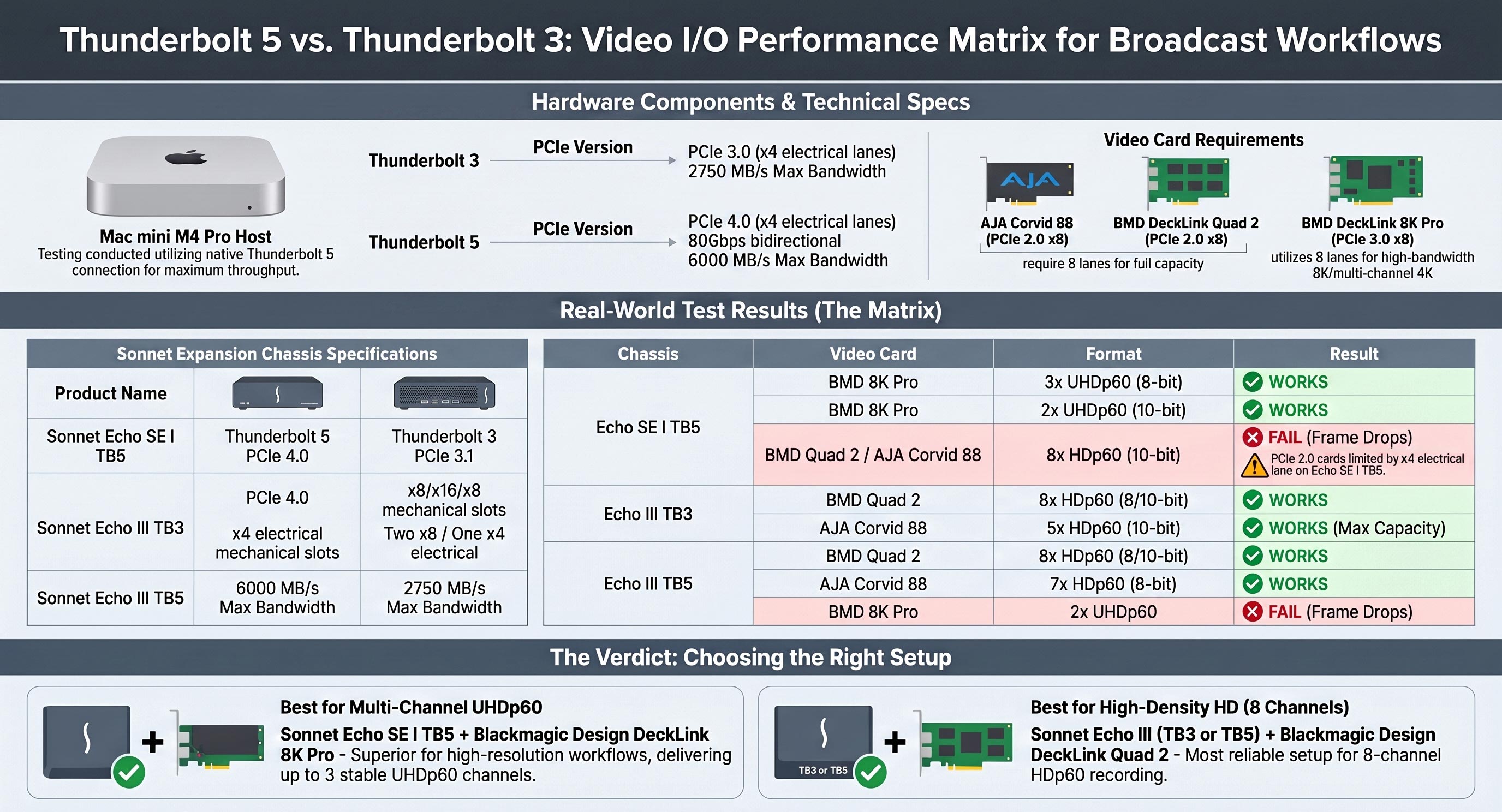
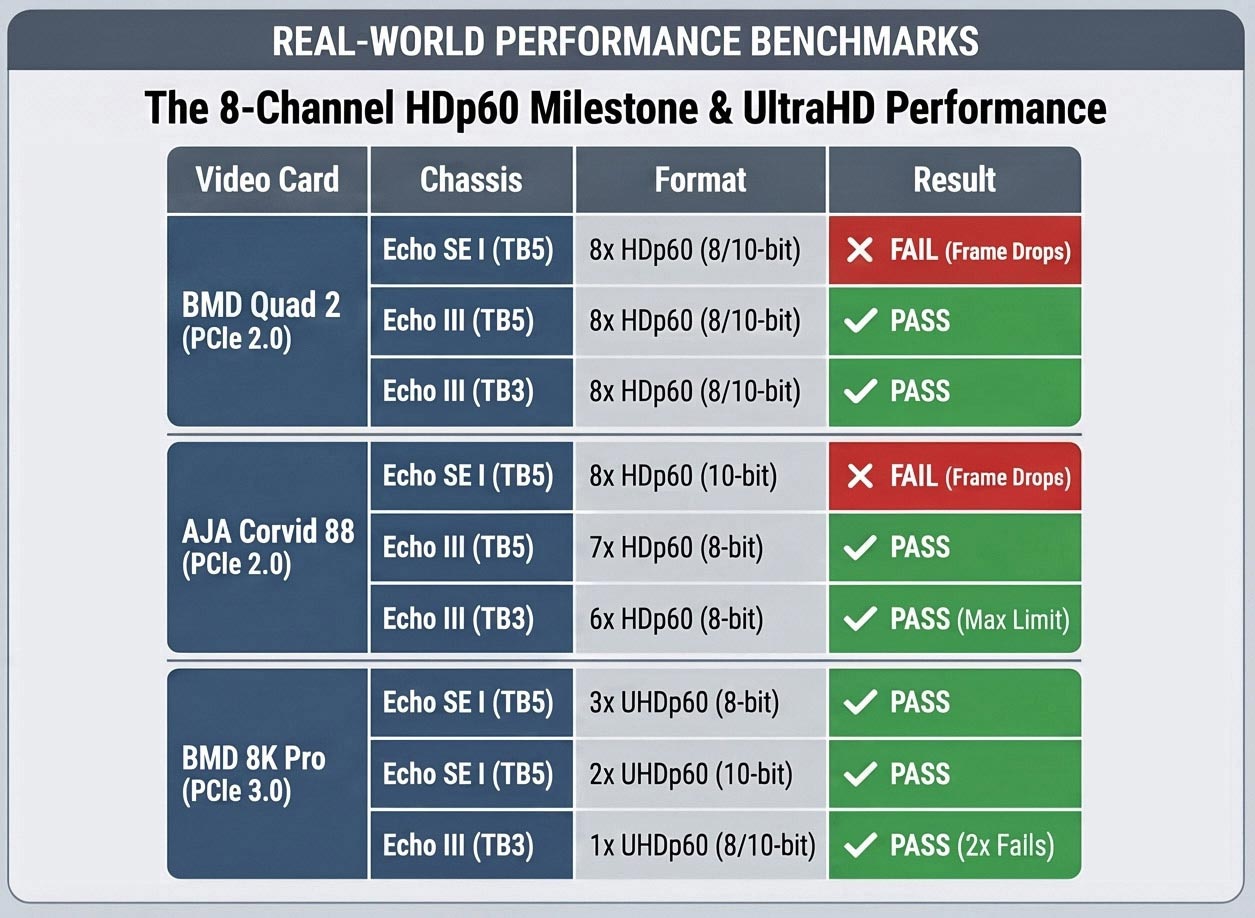
The goal of these tests was simple: to identify which setups can be trusted for different recording scenarios, from compact HD systems to high-density HD and UHD p60 workflows. This includes configurations based on Mac mini, Mac mini Pro, and Mac Studio systems, combined with devices such as AJA ioX3, AJA Corvid, Blackmagic Design Quad 2, Blackmagic Design DeckLink 8K Pro, and Blackmagic Design UltraStudio 4K.
The results clearly show that hardware selection matters. Some setups are ideal for compact 4-channel or 8-channel HD recording, while others are better suited for UHD p60 workflows. In certain cases, adding more theoretical bandwidth does not automatically increase the usable channel count, because the PCIe generation, lane allocation, card architecture, and chassis design all have to work together.
For this reason, ToolsOnAir does not recommend choosing hardware only by looking at individual specifications. A professional recording system should be planned as a complete workflow. The tested combinations shown in our configuration charts are intended to give customers a practical starting point and help avoid frame drops, bandwidth bottlenecks, or unstable channel configurations.
This is also why we created different recommended setups for different use cases. A customer who needs a compact 4-channel HD p60 ingest system has very different requirements from a customer who needs 8 channels of 10-bit HD or multiple UHD p60 channels. By publishing these tested configurations, we want to make the decision process easier and provide a clear reference for system integrators, resellers, and end users.
AJA has also introduced the new AJA Io Expand, which is another very interesting development for Thunderbolt-based professional video workflows. We have not tested this expansion chassis with our recording applications yet, but we are eager to explore it. In particular, we are interested to see whether the AJA Io Expand can enable higher channel counts with AJA cards in future just:in mac pro and Just In Mac Lite configurations.
As one of the leading broadcast software solutions for professional recording workflows on macOS and Linux, ToolsOnAir will continue to validate modern hardware platforms and publish practical recommendations for our customers. The move toward Thunderbolt-based systems creates new flexibility, but it also makes tested configurations more important than ever.
For new just:in mac pro and Just In Mac Lite installations, we strongly recommend using the tested setups shown above as a reference. These configurations are based on real-world performance tests and are designed to help customers build reliable, future-ready multi-channel recording systems with confidence.