
A capture preset contains the following parameters: TV Norm, Container, Aspect Ratio, Codec and Audio Channels. Capture presets are defined in the Just In Con guration preference panel by clicking on the Presets tab, then pressing the Preset pull-down menu and finally selecting “New...”. Once you have defined your preset, click the "Save" button and enter a descriptive name for it. Make sure that this preset is saved to "/Library/Application Support/ ToolsOnAir/Just In". Do not use any of the following characters when naming preset: / @ : | \ < >.
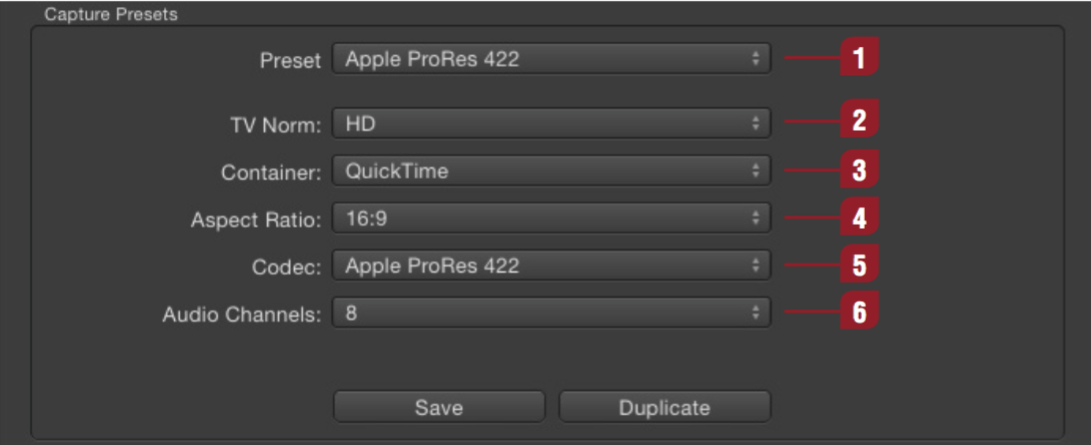
| Preset: The name of the capture preset. | |
| TV Norm: Set a TV norm here as required (PAL, NTSC, HD). | |
| Container: Choose between QuickTime, AVFoundation QuickTime (AVF) or MXF. | |
| Aspect Ratio: Configures the aspect ratio (4:3 or 16:9). HD defaults to 16:9. | |
| Codec: Choose from a list of available codecs for the selected container (QuickTime, AVFoundation QuickTime or MXF). | |
| Audio Channels: Select the desired number of audio channels and the audio track alignment (Mono or Stereo). If you’re using MXF as a container, you will not be able to choose between Mono or Stereo alignment. All channels will default to Mono. |