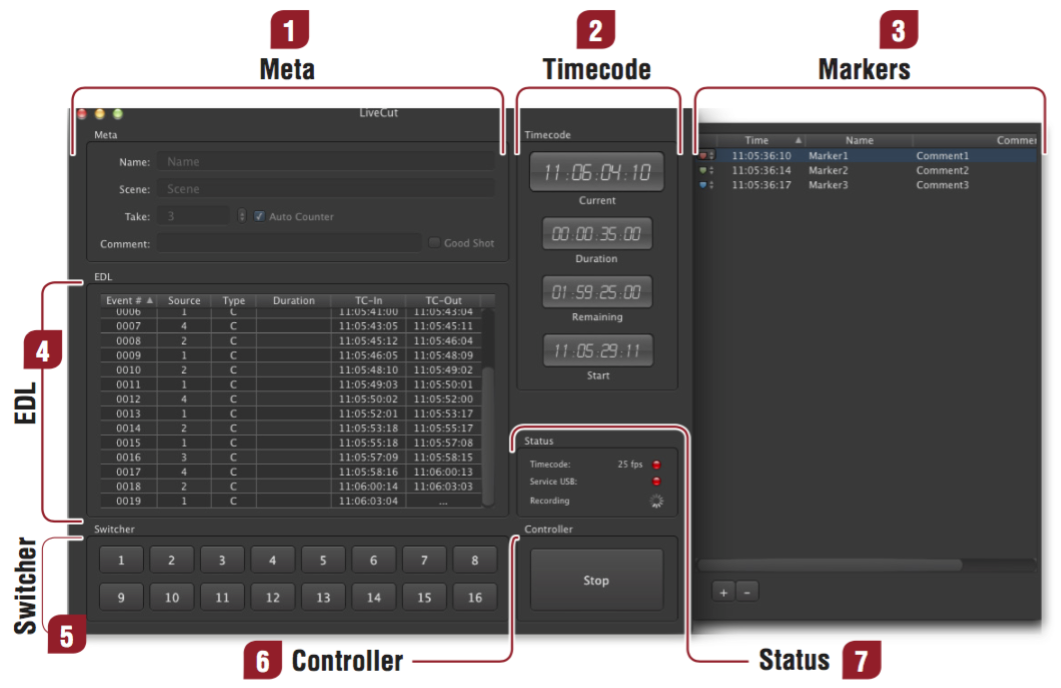
| Meta: Insert "Name", "Scene" and "Take" metadata here. This information will show up in all supported NLEs. The "Comment" and "Good Shot" (Apple Final Cut Pro 7 ONLY) markers are prompted again whenever you stop recording. |
| Timecode: Displays the currently running timecode from your selected source, as well as the duration of your sequence, the remaining recording time and the beginning of your sequence. |
| Markers: To bring up the markers drawer, open the "Markers" menu and select "Show Markers" (or use the keyboard shortcut "Cmd + L"). Press the "+" at the bottom to set a new marker during the recording process. A color and a marker name can be set, which will appear in Final Cut Pro 7 as well. Marker presets can be set in the LiveCut preferences. |
| EDL: The recorded sequence, displayed in a typical EDL style. |
| Switcher: Displays the current status of the switcher. In case of a dissolve, two buttons will be highlighted. |
| Controller: The "Start"/"Stop" button to initiate/end the recoding process. |
| Status: Displays the connection status to external devices (timecode, USB interface) as well as the status of the software (idle, recording). Red indicates a "Ready-to-Record"-status, yellow indicates no connection. |