| Apple ProRes (all avors)When using any of the Apple ProRes codecs you will be prompted to select a framerate and resolution. |
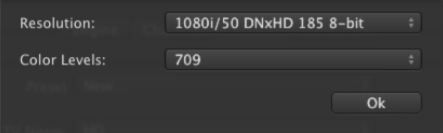
| Avid DNxHD (8-bit only)When using the Avid DNxHD codec, you will be prompted to select a resolution and the appropriate Color Level (RGB or 709). Please make sure that you’re using a recommended machine (see page 2), use a storage system with enough capacity and bandwidth! |
| H.264 codecWhen using the H.264 codec within the AVFoundation QuickTime container you will be prompted to define several settings such as: Again make sure to use a recommended machine to encode H.264 material. |
4.3 Presets: Apple ProRes, Avid DNxHD And H.264
When using any of the Apple ProRes codecs you will be prompted to select a framerate and resolution.