
About Just In
Just In is a Network Based Ingest Solution that offers Crash, Gang, Batch and Scheduled Recording. It unites Single- and Multi-Channel Ingest over SDI into MOV, MXF, MXF OP-Atom and MP4 containers into one flexible and expandable application.
Assumptions
- A basic level of IT knowledge and experience.
- You are familiar with the Macintosh environment.
- You have system administrator privileges for the network and the operating systems of the machines you are working on.
- You are experienced in installing and configuring client-server software in a TCP/IP network.
- You will install the software on machines that have been connected to a LAN or WAN by a network engineer.
- You will install the software on a machine which has no other software installed – except the operating system and the drivers needed to operate the Channel/hardware.
- You understand basic Video Ingest concepts.
- You understand general Video technologies like codecs, frame rates, transmission methods and timecodes.
The Applications
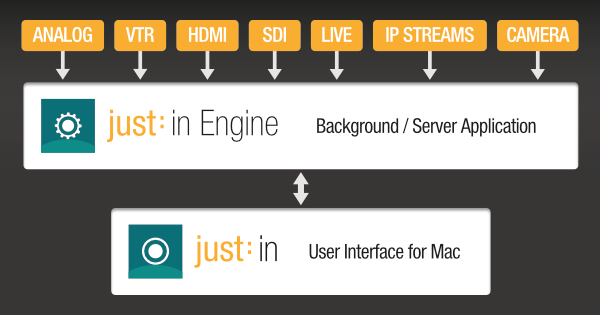
Just In Engine

- Is a background application and required for running the Just In user interface application.
- Can be run on the same machine as the Just In user interface or on a separate, network connected machine.
- Is responsible for controlling the Capturing Hardware.
- Supports one or multiple Channels (= Signals) in SD, HD and UHD/4K*.
* the number of Channels which can be recorded at the same time depends on the framerate, the format, the container, the codec, the hardware and the storage system.
Just In User Interface

- Is the user interface to capture and control multiple Channels available from one or multiple instances of Just In Engine on the network.
- Provides Realtime Video and Audio Previews from the Channels and let's you configure your Capture Settings.
Requirements
You need to know the Model Identifier of your Macs to continue.
- Open the Apple Menu on the appropriate machine.
- Select About This Mac while holding the alt key. The menu item turns to System Information…
- The Hardware Overview is displayed and you can see the Model Identifier.

| Qualified Macs for Just In Engine | PCIe-Card Setups
| Thunderbolt Setups
|
|---|---|---|
| Qualified Macs for Just In User Interface |
| |
| Operating System | OS X 10.10.5 / 10.11.6 / macOS 10.12 or higher. Administrator account required. | |
| RAM | At least 8 GB (>16 GB recommended). | |