
Just In/Just In Engine Software Verification Process fails
When opening Just In or Just In Engine for the first time, the applications will be verified by the operating system. Usually this process takes up to three minutes. If the verification should not be possible, please follow those steps:
- Open the Terminal application.
- Enter "sudo spctl --master-disable" (without quotes) and press the enter key.
- You will be asked for the admin password. Enter it and press the enter key.
- Close the Terminal application.
- Go to the System Preferences.
- Click on Security & Privacy.
- Unlock the preference pane.
- At the bottom of the General tab select Allow apps downloaded from Anywhere.
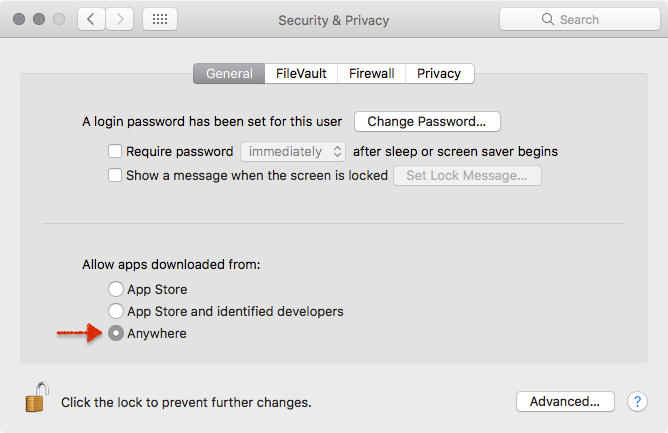
- Close the System Preferences and open Just In and Just In Engine.
- You may revert the setting after a first successful launch of Just In and Just In Engine.
Moxa Device does not work under macOS 10.13.x ("High Sierra")
There is a problem with the Virtual Serial Device of macOS 10.13 ("High Sierra") where the Moxa device cannot connect properly. Customers using a Moxa device must use macOS 10.12.x or lower, independent of the Just In version they are using.
Further Known Issues
- When running the new interface on an old Mac Pro it's not possible to change the file name. Naming conventions can be used, though.
- When using the AJA Kona 4 UFC Mode the audio passthrough is not working properly.