
To be able to connect to a Channel configured in just:connect, the Just Live and Just Play user interfaces must be configured to be able to connect to a Channel.
- Open Just Live or Just Play. The application will start and display the login window.
- Click on the sprocket icon.

- Double-click on Double-click to add a Channel.
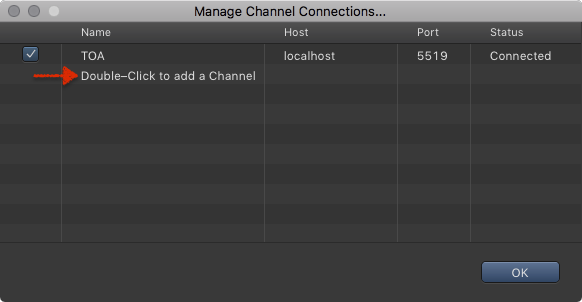
- In the Name column: Enter the Name of the Channel of the just:connect which administrates the Channel you want to connect to.
- In the Host column: Enter the IP address of the just:connect which administrates the Channel you want to connect to.
- In the Port column: Enter the Port of the just:connect which administrates the Channel you want to connect to.
- Repeat this for each Channel you would like to get access to from this machine.
- Click on the OK button.

Make sure the ToolsOnAir components can communicate with each other when operating them on separated networks.