
Besides playing Videos and Graphics, Just Live and Just Play also allow you to manage live incoming signals like studio signals or satellite feeds and send it to the output.
This can be done by…
- …using the more traditional way by controlling a mixer/router.
- …configuring the Playout Video device to do so.
Using the Playout Video device there are two different ways:
- The Downstream Keyer based method (DSK-based)
- The non Downstream Keyer based method (Non DSK-based)
Both methods can be used in SD and HD but not in UHD.
DSK-based
Using the DSK-based method the Live Signal is passed through using the AJA device and there is no delay added to the Live Signal.
- Works with all supported AJA devices.
- Does not work with devices from Blackmagic.
- Live Signal is not sent to the just:out engine.
- Live Signal can not be seen in the On Air view of the Just Live/Just Play user interface.
- Live Signal can not be part of a realtime Graphics template - scaling as part of the template for example.
- Live Signal can not be part of the integrated RTMP streaming engine.
- Closed Captioning data which comes with the Live Signal can not be passed through to the output.
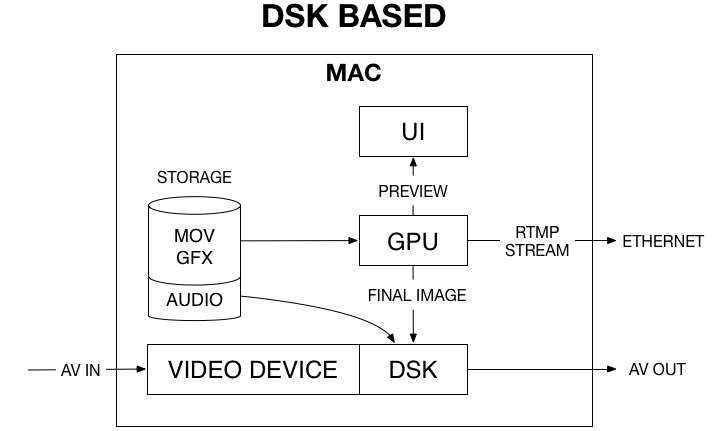
Using the AJA DS Keyer means that the video card synchronizes to the incoming video and not to the reference signal. Therefore any reference signal attached to the Ref In will be ignored, so make sure that the incoming video signal is stable. In order to stabilize the signal in advance (i.e. before it is sent to the video card input) you must use a frame synchronizer. Suited frame synchronizers can be found on the AJA Website or you can also use a BMD ATEM switcher.
Non DSK-based
Using the non DSK-based method the Live Signal is sent to the just:out engine which buffers the incoming signal. A minimum of 12 frames of delay is added to the Live Signal. This means that the signal which has been received 12 frames ago is visible at the output. The delay finally depends on the Video buffer defined for the just:out engine under the Layers & Engines tab of just:connect and can be between 12 frames (Video buffer = Off) and a bit more than 3 seconds (Video buffer = 3 Seconds).
- Works with the IO4K and the Kona 4 from AJA.
- Works with all devices from Blackmagic which have "4K" in their name.
- Live Signal is sent to the just:out engine.
- Live Signal can be seen in the On Air view of the Just Live/Just Play user interface.
- Live Signal can be part of a realtime Graphics template.
- Live Signal can be part of the integrated RTMP streaming engine.
- Closed Captioning data which comes with the Live Signal can be passed through to the output.
