
Compatibility Matrix for Just In Mac Pro 2026.x
Important: The Just In Mac Pro 2026 solution is optimized exclusively for Apple silicon hardware (M1-M5) to provide you with the best performance and experience.
By fully transitioning to the Apple silicon platform, we ensure optimal performance, stability, and compatibility with the latest advancements.
If you are planning to deploy Just In Mac on INTEL-based Macs (MacPro7,1 or Macmini8,1) please use version 6.5 or version 2025.1!
Nevertheless, we will, of course, continue to support our customers who still have certified Intel-based Macs running qualified versions of Just In Mac.
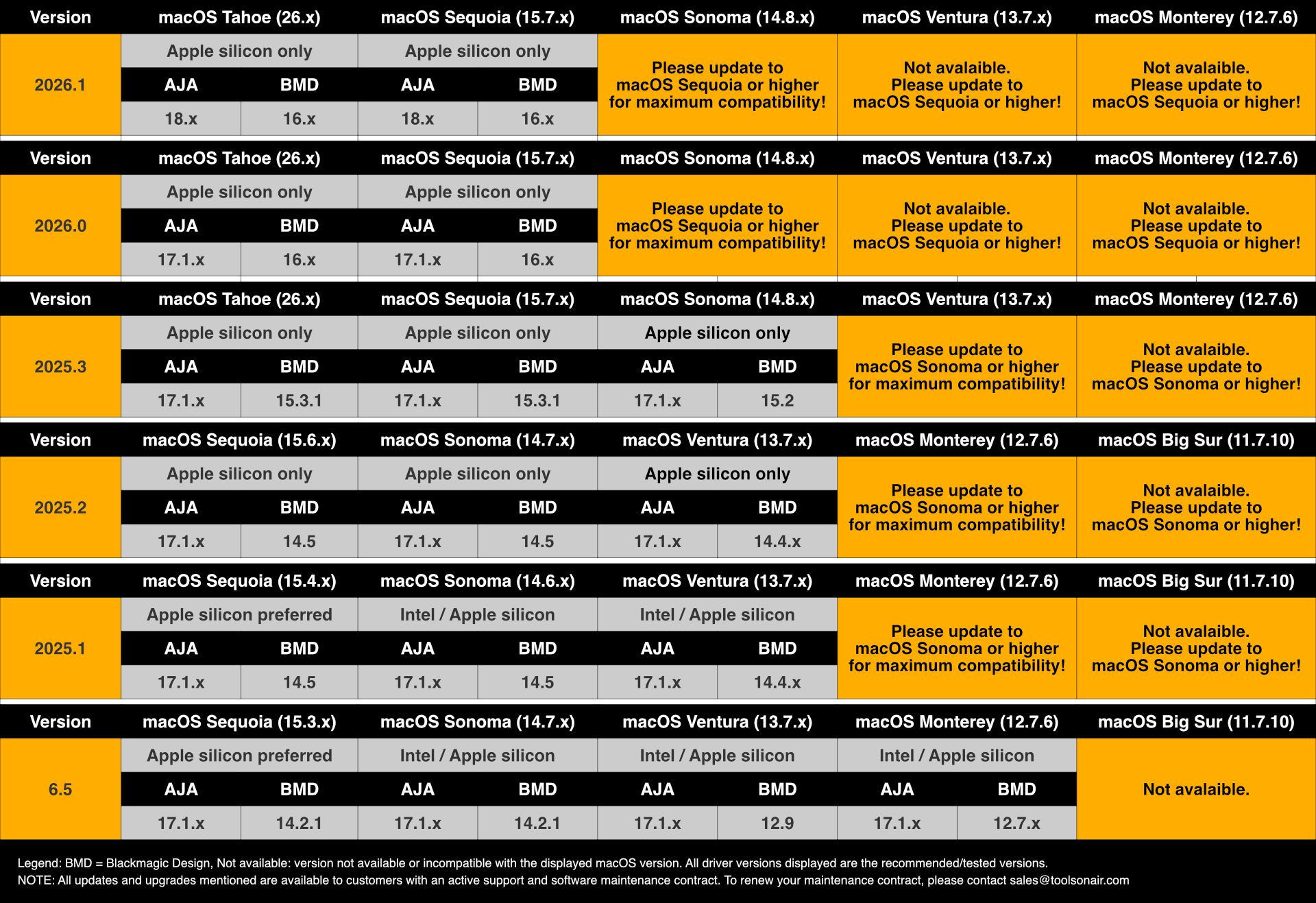
The specific hardware setup, third-party drivers, software and operating systems should always be tested thoroughly with the free of charge demo software provided by ToolsOnAir before the final installation.
Operating System
The supported macOS versions are (recommended macOS versions are displayed in Bold)
macOS 26.4.x and higher (“Tahoe”) - recommended for daily operations
macOS 15.7.x (“Sequoia”) - recommended for daily operations
macOS 14.8.x (“Sonoma”) - please update to macOS Sequoia or higher!
Administrator account required for installation, configuration and to collect logs.
Date and Time Format
Please verify that your macOS Date & Time settings are compatible with the Gregorian Calendar format (Gregorian date formats include the following: ddmonyy, ddmonyyyy, mm/dd/yy, or mm/dd/yyyy). Using the Gregorian calendar ensures consistency and accuracy in the Date header, avoiding misinterpretation, synchronisation and activation errors. This is crucial for the Schedule mode to fetch the correct Start/Stop Date and Time information.
Memory/RAM
We recommend installing at least 16 GB on the machine running the Just In Engine application on Apple silicon-based Macs (M1-M5).