This chapter contains a list of supported video devices to record in SD, HD, or UHD. When using a Thunderbolt device from AJA or Blackmagic Design or when using PCIe chassis connected via Thunderbolt, please beware of the technical bandwidth limitations (especially when working with UHD signals).
Thunderbolt PCIe Speed
Please get in contact with us, when planning a Thunderbolt-based capture/recording setup.
We recommend providing a continuously stable signal during your recording processes, otherwise, the ingest process may be interrupted, and the recorded files may not be usable. To stabilize the signal in advance (= before it is sent to the video card input) please consider using a Frame Synchronizer.
AJA
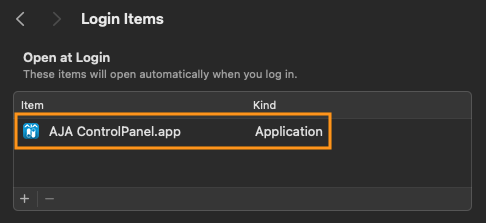
Please ensure that the AJA Control Panel is launched automatically with the macOS system by configuring it in the Login Items section within macOS System Preferences (by default after AJA driver installation). If the AJA service fails to start correctly during system startup, the Just In Mac Lite application may exhibit unexpected behavior. You can choose to hide the AJA Panel afterward, if desired.
When using AJA PCIe cards within the Mac Pro, please ensure that you are using Slot 1 or 2.
KONA 5
KONA 4
KONA HDMI
KONA LHi (no VANC support)
KONA 1
KONA LHe Plus (no VANC support)
Io X3
Corvid 88
Corvid 44 12G
Corvid 44 12G BNC
Corvid 44
Corvid 44 BNC
Please verify that you have the AJA driver v18.x installed on the system running the latest Just In Mac Lite application. In addition, please check if the latest firmware is installed on the device.
Blackmagic Design
Intermittent SDI Signal Disruptions with driver versions 16.x and higher
An issue in Blackmagic Design DeckLink drivers 16.x and higher may cause recurrent SDI signal interruptions, particularly during multichannel recordings. This behavior has been observed, especially when one or more DeckLink cards are used in an external Thunderbolt chassis.
Blackmagic Design is aware of the issue and working on a fix.
Until then, please contact ToolsOnAir Support for assistance.
DeckLink 8K Pro G2/DeckLink 8K Pro Mini
DeckLink 4K Extreme 12G
DeckLink IP
DeckLink IP 100G (final validation pending)
DeckLink Studio 4K
DeckLink SDI 4K
DeckLink Quad 2
DeckLink Duo 2
DeckLink Duo 2 Mini
UltraStudio 4K Extreme 3
UltraStudio 4K Mini
UltraStudio HD Mini
UltraStudio Recorder 3G
Please verify that you have the Blackmagic Design Desktop Video driver v16 or higher installed on the system running the Just In Mac Lite application.
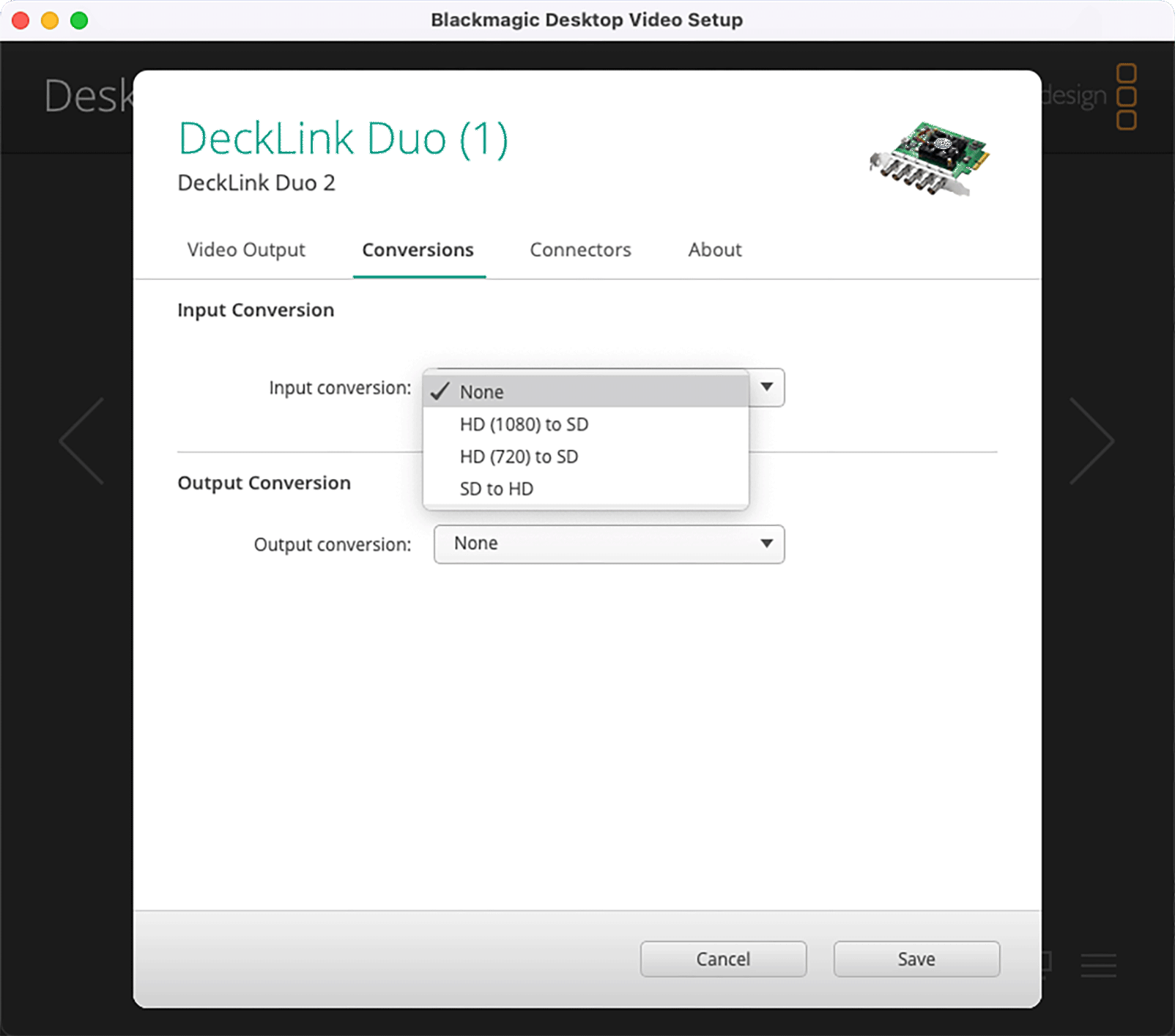
When using Blackmagic Design I/O cards please ensure that the “Input Conversion” settings is set to “None” as any other settings might interfere with the correct channel input acquisition process.