
It is possible to override the repositories which are defined for a channel for a single engine client. This is useful in situations where an engine uses a storage system for playout which is different compared to the other interfaces and engines connected to this channel.
To override the channel's repositories, select the channel in the "Channel View" and then activate the "Layers & Engines" tab. Select an existing engine and choose "Configure engine".
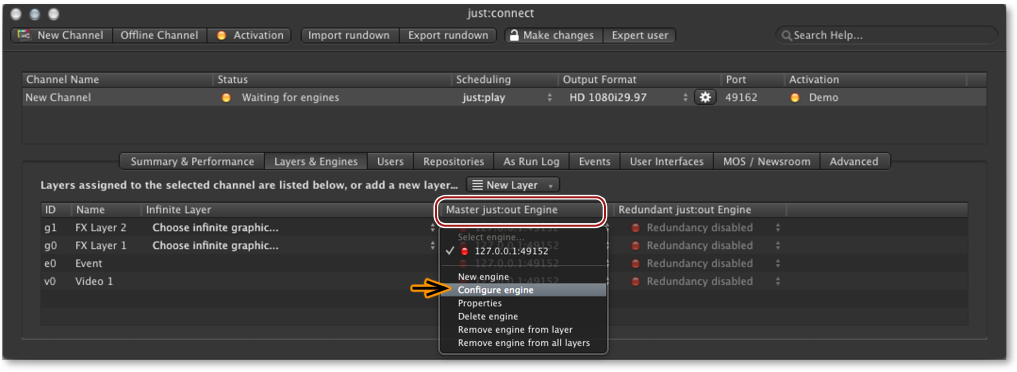
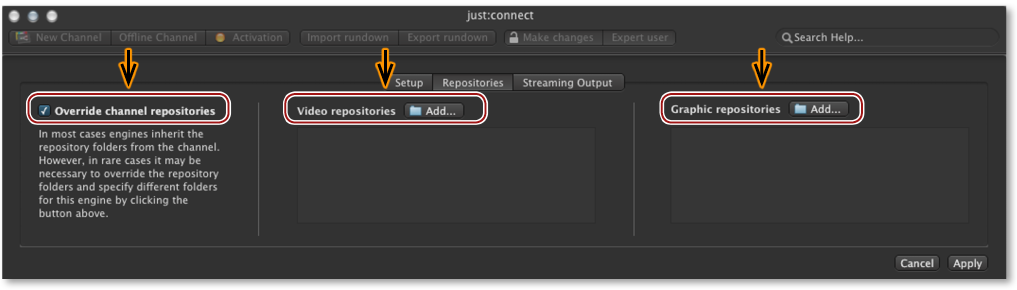
This opens a window with three tabs. Activate the "Repositories" tab. Now activate the "Override channel repositories" checkbox and define new "Video" and "Graphic" repositories by clicking on the corresponding "Add..." buttons.
You must restart just:out for any changes to take effect. Restarting just:out will stop the final output temporarily.