
Just Play Lite NDI is an automated 24/7 Master Control Playout solution with SD, HD, UHD format and NDI® High Bandwidth Live Input/Output support, seamlessly integrating live feeds and static, as well as animated realtime graphics.
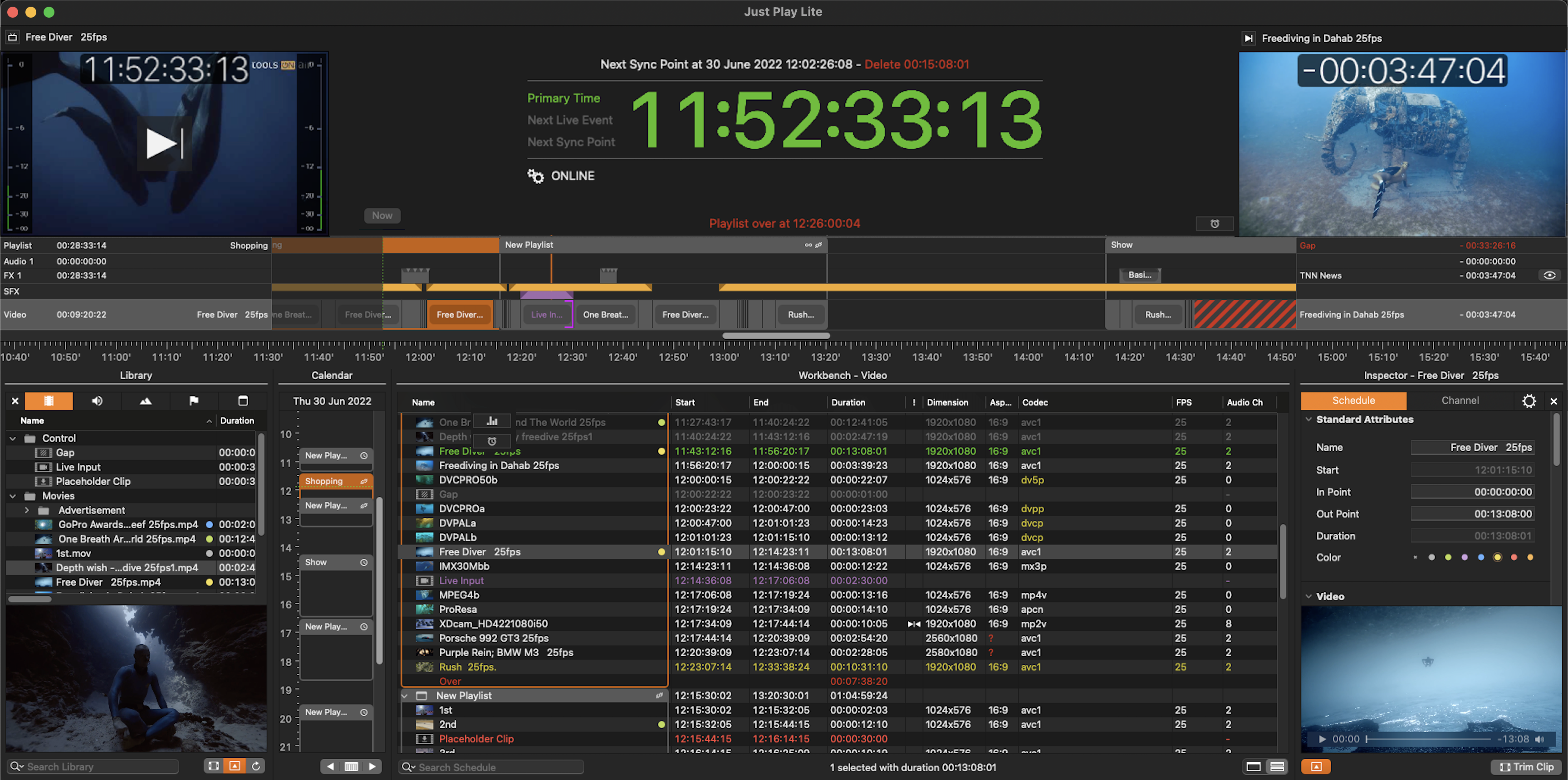
The Just Play Lite NDI user interface represents a simple way to build a rundown with elements like Videos, Placeholders, Gap Fillers, Live Events and Audio files, with static or dynamic real-time graphics combined with on- or offline scheduling.
The Just Play Lite NDI user interface connects directly to a Channel (which has been configured by your system administrator), allowing direct and last-minute changes. At any time in the scheduling process, the user can control planning.
The Just Play Lite NDI application allows users to create, edit, structure and import/export Playlists. A Playlist – which contains all kinds of media – can be planned and executed weeks in advance, which allows a completely unattended remote operation.
If this is not the case, please refer to the Getting Started Chapter or contact your system administrator.
Starting a Just Play Lite NDI Channel
Go to your Applications folder and open the Just Play Lite NDI folder.
Double-click the Just Play Lite NDI application and the Just Play Lite NDI user interface will show up.