
Before proceeding, you must stop the Channel by deactivating the checkbox. Stopping the channel will also stop the playout.
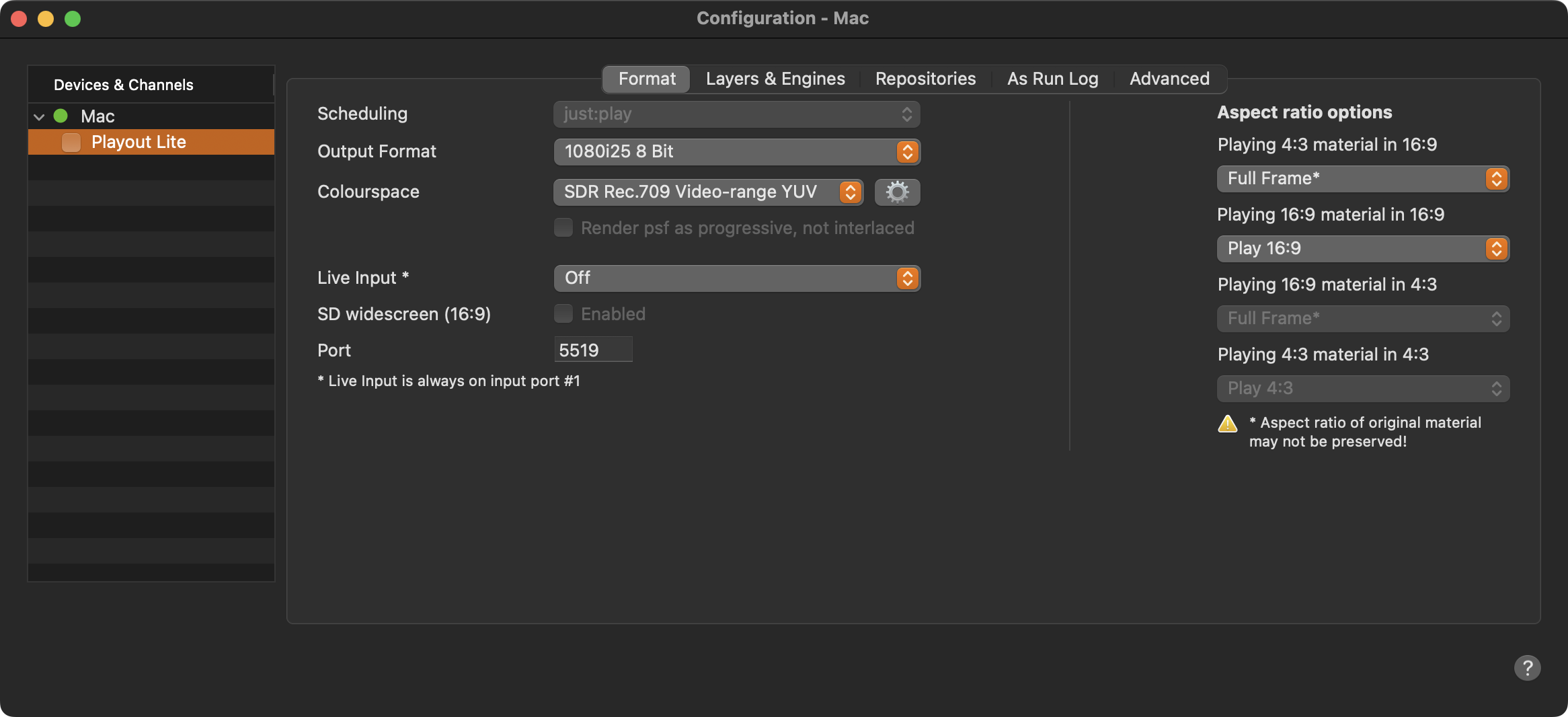
Scheduling: Shows the user interface used by this channel.
Output Format: This is the format (pixel size, frame rate, and bit depth) that is used by the selected Channel which also defines the final output signal.
Colourspace: Allows to define the Color space used to process the final output. Only color spaces valid for the selected Output Format are selectable with the most common one preselected, if more than one color space is possible.
Live Input:
OFF
The ability to switch to a live source is disabled.
On, default black
Enables the ability to switch to an available NDI signal by scheduling a “Live Input” element in the rundown.
If no Playlist is scheduled, black will be played out.
On, default pass-thru
Enables the ability to switch to an available NDI signal by scheduling a “Live Input” element in the rundown.
In case no playlist is playing in the video track, the output shows the live NDI signal.
SD widescreen (16:9): Activate this checkbox to run an SD (standard definition) Channel, to play out in SD Wide Screen mode.
Port: Defines the Port which is used by the selected Channel. Keep in mind that a Port can only be used once per machine.
Aspect Ratio Options: Define how differences in the aspect ratio should be handled by default. This preset can be overwritten for each Video in the Inspector of Just Play Lite NDI. Refer to Chapter Aspect Ratio Control .