
To change Channel Settings deactivate the desired Channel(s) by unchecking the corresponding checkbox(es).
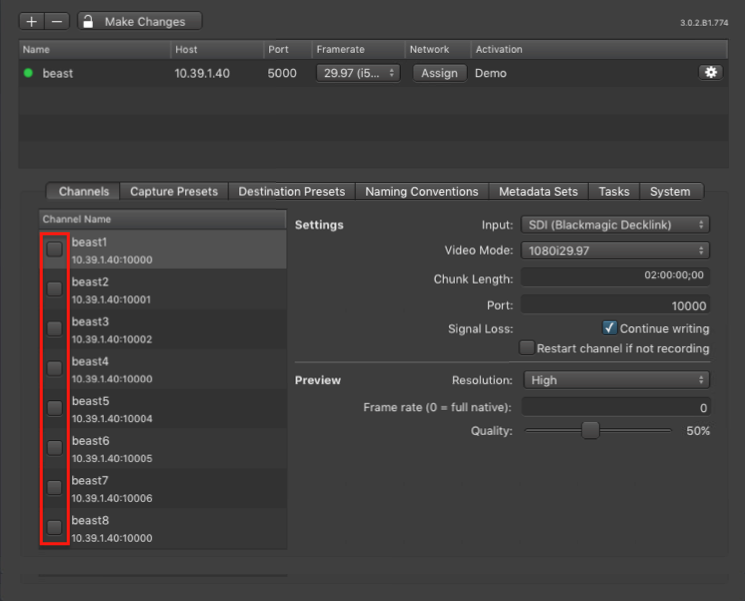
Deactivating a Channel will make it unavailable in connected Just In User Interfaces.
Basic Channel Settings

Settings
- Channel Name: edit the Channel name by double clicking the name within the Channel List.
- Input Source: select the Input Source here.
- Video Mode: select a Video Mode here. The modes depend on the Engine's Framerate and the Video Device.
- Chunk Length: set the Chunk Length here. The maximum is 12:00:00:00.
- Port: edit the Channel Port here.
- Signal Loss: by default a Channel continues to write into the same container when there is a signal loss during recording. The gap during the signal loss will be filled with black frames automatically. The Channel might get out of AV sync in case of a a signal loss that occurs on a running Channel/Engine. By disabling this option, the channel stops recording when there is a signal loss during recording.
- Restart channel if not recording: this option is disabled by default. When enabling this option the Channel will be restarted after a signal loss. This only affects idle Channel. Recording Channels will not be restarted. Note for AJA Video devices: this option cannot be disabled.
Preview Settings
- Resolution: two resolution options are available:
- High: 640x360px
- Low: 480x270px
- Frame rate: the preview frame rate can be changed between zero and 30.
- Quality: can be changed between 10 and 100%.
(Re-)Enabling a Channel
After changing the settings of a Channel you need to enable it again by clicking on the corresponding checkbox. You can only activate Channels with valid Video Modes.
