
This chapter explains the Just In User Interface based on an already connected Channel.
Main Window
The main window includes the Inspector as well as up to 64 Channel Views, each of them showing the Signal which is currently received by the connected Channel. The Timecode and Audio Bar overlays are shown depending on the settings defined in the Preferences (see below). By default all overlays are shown.

Preferences
You can access the Just In User Interface Preferences in the menu Just In → Preferences or by using the keyboard shortcut command + comma.
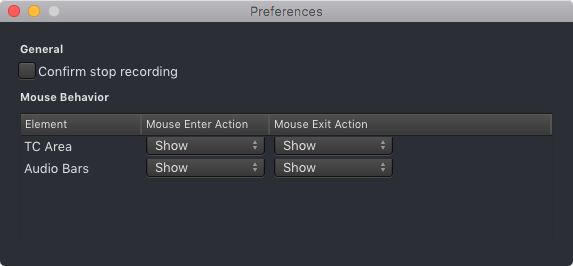
General
- Confirm stop recording: this is a security feature to avoid unindented recording stops. When enabled a Recording can only be stopped by pressing the Record button a second time within 5 seconds. This feature concerns all recording modes.
Mouse Behavior
You can define which overlays will be shown when entering or exiting a Channel View.
- Mouse Enter Action: select whether the particular element will be shown or hidden when the mouse is hovering over a Channel View.
- Mouse Exit Action: select whether the particular element will be shown or hidden when the mouse is not hovering over a Channel View.