
Supported Container Formats and Codecs
The Just Live Lite NDI application supports the following codecs and containers without installing any additional ones:
Container | Codecs |
|---|---|
.mov | DVC, DVCPRO, H.264, HEVC (H.265), ProRes (except RAW/HQ), some MPEG-2 compressions |
.mp4 | H.264, HEVC (H.265) |
.m4v | H.264 |
.mpg and .mpeg | several MPEG-2 compressions |
After installing the Apple Pro Video Formats codecs, the following codecs and containers are supported as well:
Container | Codecs |
|---|---|
.mov | DVCPRO, DVCPRO 50, DVCPRO HD, HDV, ProRes RAW/HQ, Uncompressed |
.dv | DV, DV25 |
.mxf | AVC-Intra, DNxHD/HR, MPEG IMX, XDCAM EX/HD/HD422, XAVC |
After installing the Apple Pro Video Formats codecs, there are also some other codecs and containers supported, such as XAVC and XF-AVC/HEVC, which have been partially tested.
QuickTime Player can be used to test if a video can be played out by our engine or not. Using another application than the QuickTime 10 Player (VLC; Switch, …) to check the compatibility is not possible.
Codecs Missing Warning
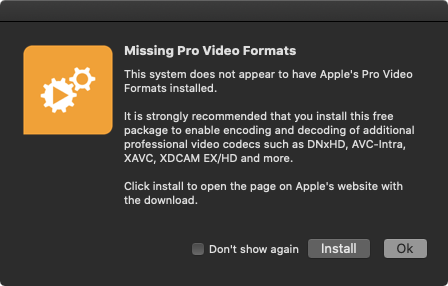
In case that the Apple Pro Video Formats codecs cannot be found when you start Just Live Lite NDI, a warning will be shown. Click Install to open the Link to the Apple download page mentioned in the installer image.
macOS System - Codecs Location
The Apple Professional Video Workflow Plug-Ins are located in the path listed below. If no codecs are listed in this directory, then this macOS machine has no Apple Pro Video Formats codecs installed:
/Library/Video/Professional Video Workflow Plug-Ins
Where to obtain the Apple Professional Video Formats Codecs
Due to licensing restrictions, we are not allowed to ship any Apple codecs along with our products.
To obtain the appropriate professional Apple codecs you need to download and install the Free Apple Pro Video Formats (“ProVideoFormats.dmg”) from Pro Video Formats - Apple Support . Once downloaded, open the “ProVideoFormats.dmg” image and double-click the “ProVideoFormats.pkg” installer to perform the installation.
Playout Engine Features
Mixing Videos with different pixel sizes in the same Playlist.
Mixing all supported codecs in the same Playlist.
Mixing Videos with different aspect ratios in the same Playlist.
Mixing Video with different broadcast frame rates in the same Playlist.
The field order will be inverted automatically if needed. This can be overridden per clip with the Invert Fields function in the Inspector.
When removing frames using QuickTime Player you need to export the Video as a new file after that.
Playout Engine Limitations
Not all functions coming with a certain container or codec can be used.
You cannot play video files created with more than one codec. Make sure that all video files are created using a single codec.
Using MXF Videos
To play MXF-wrapped video clips, the Just Live Lite NDI application relies on the technology components provided within the Apple Pro Video Formats codecs package. Please ensure to install on the machine running the Just Live Lite NDI application.
Due to the way MXF works, it might take several seconds to open an MXF container, depending on its length and the number of Audio tracks coming with the Video. This implies that the readout of metadata in the Library of the user interface, as well as adding such a video file to any rundown will not happen instantly (as opposed to all other containers).