Just Live & Just Play v2.0 · v.2.0 legacy documentation

7.7 Adding A Movie To A Playlist (v2.0)

Movies are the foundation of a tv channel and therefore the kind of element which are used most of the time. There are several ways to add a Movie to a rundown.

Movies are the foundation of a tv channel and therefore the kind of element which are used most of the time. There are several ways to add a Movie to a rundown.

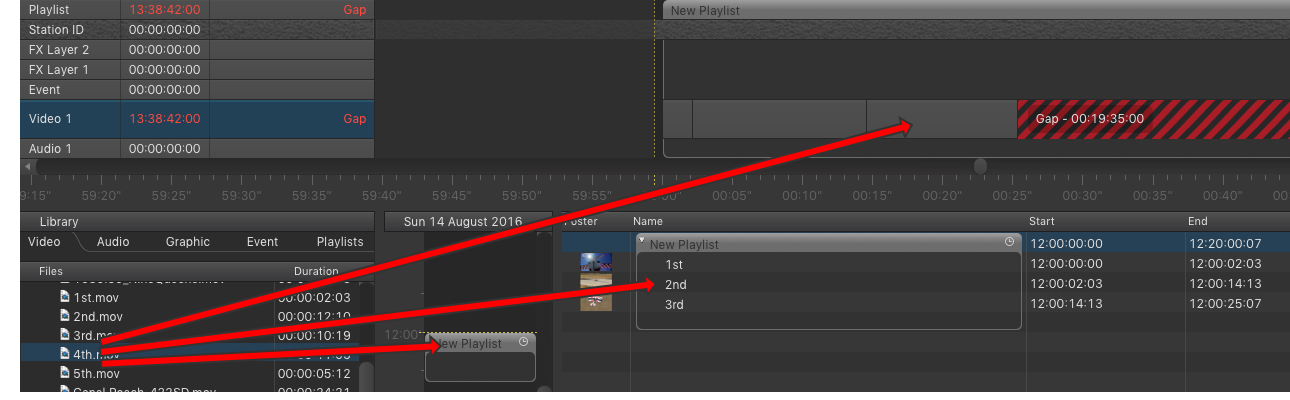
7.7 Adding A Movie To A Playlist (v2.0) screenshot

Movies can be added to a schedule using the Video track by drag and drop them into:

  • …an empty area in the calendar view. In this case, a playlist with the proper duration is automatically created with the elements you have dropped in it. 
  • …an existing playlist in the calendar view. The element(s) will be added at the end of the playlist.
  • …an existing playlist in the workbench. Before dropping the element(s), its position is indicated by a small turquoise bar which appears between existing elements.
  • …a playlist in the timeline. Before dropping the element(s), its position is indicated by a small blue bar which appears between existing elements.

It is not possible to add a Movie to the rundown whose drop point is in the past. This would change the current playout and will therefore be rejected. A warning will be shown instead.