
CORE I/O
User Manual
Connect to CORE I/O, configure the system, and run browser-based ingest, loop recording, transcoding, media management, and playout workflows.
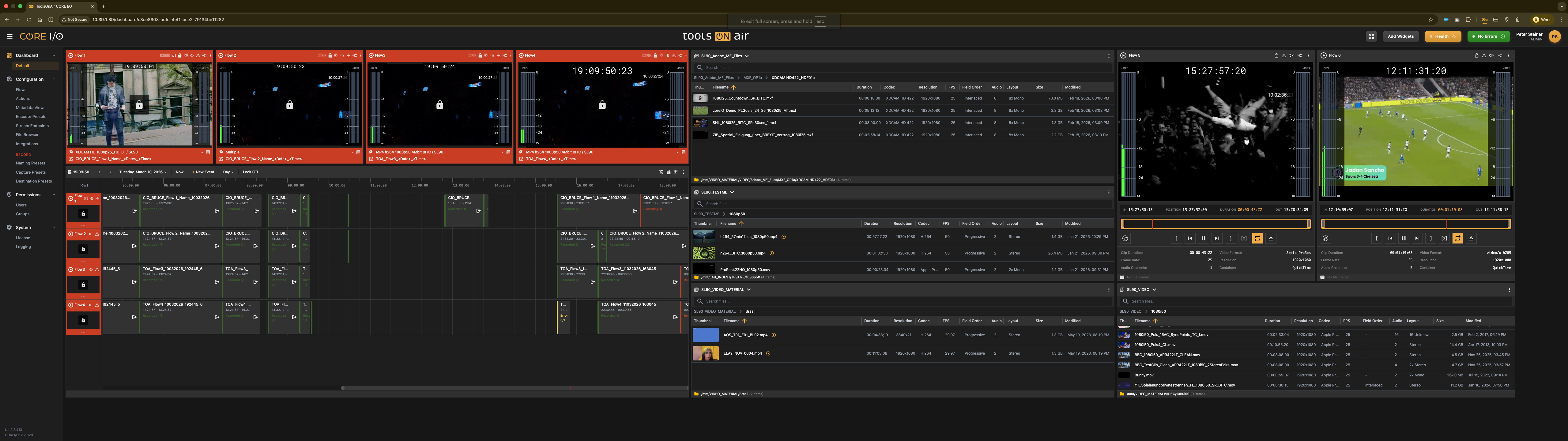

Start with the essentials
Follow the main sections or search for a specific setting and workflow.
Browse the complete manual
Choose a top-level section. Every nested topic remains available in the article navigation.
Getting Started
Open this section of the CORE I/O user manual.
Explore section →Manual sectionConcepts
Open this section of the CORE I/O user manual.
Explore section →Manual sectionApp Bar and Navigation
Open this section of the CORE I/O user manual.
Explore section →Manual sectionProfile and Dashboard Management
Open this section of the CORE I/O user manual.
Explore section →Manual sectionDashboards and Widgets
Open this section of the CORE I/O user manual.
Explore section →Manual sectionFile Browser
Open this section of the CORE I/O user manual.
Explore section →Manual sectionRecord Viewer
Open this section of the CORE I/O user manual.
Explore section →Manual sectionRecord Timeline
Open this section of the CORE I/O user manual.
Explore section →Manual sectionLoop Viewer
Open this section of the CORE I/O user manual.
Explore section →Manual sectionLoop Segment Exporter
Open this section of the CORE I/O user manual.
Explore section →Manual sectionTranscode Viewer
Open this section of the CORE I/O user manual.
Explore section →Manual sectionSingle Player
Open this section of the CORE I/O user manual.
Explore section →Manual sectionMulti Player
Open this section of the CORE I/O user manual.
Explore section →Manual sectionShow Builder
Open this section of the CORE I/O user manual.
Explore section →Manual sectionRough Cut Editor
Open this section of the CORE I/O user manual.
Explore section →Manual sectionTransfer Monitor
Open this section of the CORE I/O user manual.
Explore section →Manual sectionFlow Controller
Open this section of the CORE I/O user manual.
Explore section →Manual sectionFlows
Open this section of the CORE I/O user manual.
Explore section →Manual sectionActions
Open this section of the CORE I/O user manual.
Explore section →Manual sectionMetadata Views
Open this section of the CORE I/O user manual.
Explore section →Manual sectionEncoders
Open this section of the CORE I/O user manual.
Explore section →Manual sectionExport Presets
Open this section of the CORE I/O user manual.
Explore section →Manual sectionStream Endpoints
Open this section of the CORE I/O user manual.
Explore section →Manual sectionFile Browser Configuration
Open this section of the CORE I/O user manual.
Explore section →Manual sectionNaming Presets
Open this section of the CORE I/O user manual.
Explore section →Manual sectionCapture Presets
Open this section of the CORE I/O user manual.
Explore section →Manual sectionDestination Presets
Open this section of the CORE I/O user manual.
Explore section →Manual sectionIntegrations: Storage and Transfer
Open this section of the CORE I/O user manual.
Explore section →Manual sectionIntegrations: Production
Open this section of the CORE I/O user manual.
Explore section →Manual sectionIntegrations: Notifications and Sign-in
Open this section of the CORE I/O user manual.
Explore section →Manual sectionGlobal Settings
Open this section of the CORE I/O user manual.
Explore section →Manual sectionWidget Defaults
Open this section of the CORE I/O user manual.
Explore section →Manual sectionLicense
Open this section of the CORE I/O user manual.
Explore section →Manual sectionLogging
Open this section of the CORE I/O user manual.
Explore section →Manual sectionUsers
Open this section of the CORE I/O user manual.
Explore section →Manual sectionGroups
Open this section of the CORE I/O user manual.
Explore section →Manual sectionCORE I/O Deployment, Appliance & Format Guide
Open this section of the CORE I/O user manual.
Explore section →Manual sectionREST API
Open this section of the CORE I/O user manual.
Explore section →Manual sectionKeyboard Shortcuts
Open this section of the CORE I/O user manual.
Explore section →Manual sectionTimecode and Frame Rates
Open this section of the CORE I/O user manual.
Explore section →Manual sectionTroubleshooting
Open this section of the CORE I/O user manual.
Explore section →Manual sectionGlossary
Open this section of the CORE I/O user manual.
Explore section →