
Use the License page to activate CORE I/O on this server and review the licensed capacity. The page shows the available flows, dashboards, features, and concurrent user seats.
Open it from the sidebar's System section (admins only).
Layout
The page has two cards. Active Seats at the top lists who currently holds a licensed seat; License Management below it holds the activation form and the license details. Without an active license the management card shows "Activate your product license" and, next to the activation form, "No active license" with "Enter an activation code to get started". With a license the header reads "Your license is active" and carries a green Active badge.
The License page
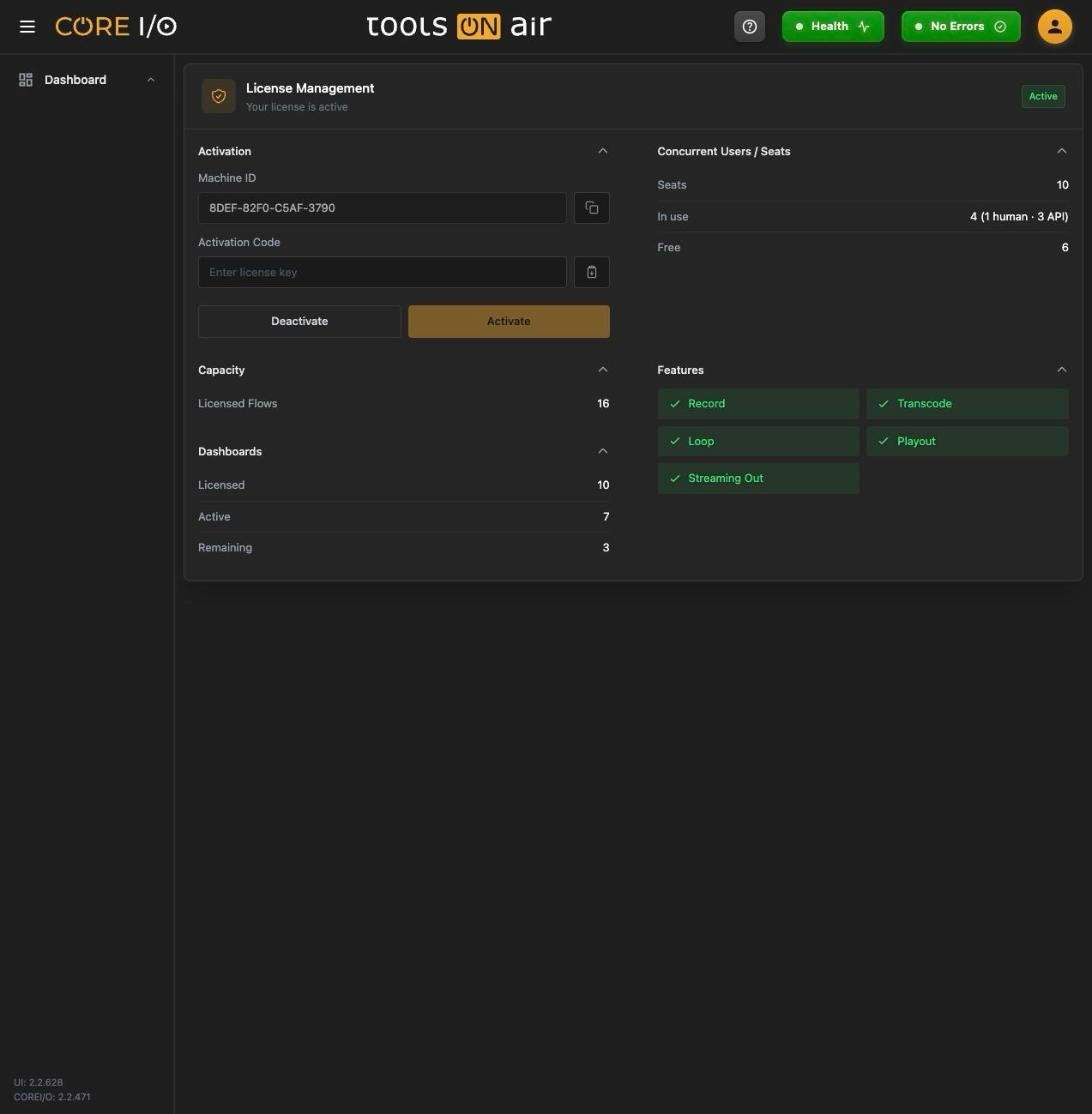
Activating the license
The Activation section has two fields and two buttons.
- Copy the read-only Machine ID and send it to ToolsOnAir. The copy button displays "Machine ID copied to clipboard."
- Paste the key you received into Activation Code. You can also use the paste button next to the field.
- Click Activate. The button remains disabled while the field is empty. A successful activation displays "License activated." A rejected key displays "Activation failed."
Deactivate releases the license from this machine ("License deactivated." or the backend's message). It is disabled while no license is active.
License details
Once a license is active, three more sections appear. Each section header can be collapsed by clicking it.
| Section | Rows |
|---|---|
| Concurrent Users / Seats | Seats (the licensed number, or Unlimited), In use (total, with the split "n human · n API"), Free (remaining, Unlimited when unlimited; highlighted in amber when it reaches 0). |
| Capacity | Licensed Flows, and Expiry Date when the license expires. |
| Dashboards | Licensed, Active, Remaining (amber at 0). |
| Features | Record, Transcode, Loop, Playout, Streaming Out: green with a check when licensed, gray with a cross when not. |
Concurrent seats
The license limits how many sessions are signed in at once, not how many accounts exist. A person holds a seat while signed in (an idle session releases it after a while without ending the session); an API user holds a seat as long as it has a token. The Users page shows the same seat counters above its list.
Active seats
The Active Seats card (admins only) lists every seat in use: "n of m in use", or "n in use · unlimited seats". Columns:
| Column | Content |
|---|---|
| User | The account name. The same user appears once per session. |
| Type | Human (blue) or API (amber). |
| Detail | For humans the IP address and the start of the browser's user agent; for API users the token name. |
| Last Activity | Timestamp of the session's last request. |
| Action | Log out for a human ("Logs this user out of all sessions and frees the seat") or Revoke token for an API user ("Revokes this API user's token and frees the seat"). |
When nobody is signed in, the card reads "No seats in use" and "Nobody is currently logged in".
Freeing a seat
- Click Log out or Revoke token on the row.
- Confirm with Confirm (or Cancel).
- A toast confirms that the user was logged out or that the selected user's token was revoked. The counters then refresh.
The list refreshes on every login, logout and token change elsewhere, and polls every 30 seconds while the page is open, since a session that simply goes idle sends no notification.
When every seat is taken
If your own session cannot renew because all licensed seats are in use, the app does not sign you out.
Instead a full-screen overlay All licensed seats are in use appears with the message from the backend and the note "Your session is still valid - you'll be reconnected automatically as soon as a seat frees up." It retries every 30 seconds and immediately when a seat is freed. Retry now retries at once; Sign out returns to the login page.
At login, the same condition is reported on the login page as "All licensed seats are currently in use." (or the backend's own message). Logging out another user from Active Seats, or revoking an API token, frees a seat.
Good to know
Seats: 0 licensed means unlimited; the Free row then reads Unlimited.
An API user's first token claims a seat. Creating it is refused with the backend's message when no seat is free; rotating an existing token never needs a new seat.
Log out on the Active Seats card ends all of that user's sessions, not just the one in the row.
Only admins see the Active Seats card; other users who reach the page see the license details only.