
A stream endpoint is a named network address for an SRT, UDP, RTP, or RTMP stream, or the URL of an HLS playlist. Flows refer to endpoints by name, so you configure each address once and select it on the required input or output nodes.
The Stream Endpoints page
Opening the page
In the sidebar, open Configuration and select Stream Endpoints, or go to /stream-endpoints. The header reads "Configure SRT, UDP, RTMP, RTP, and HLS endpoints".
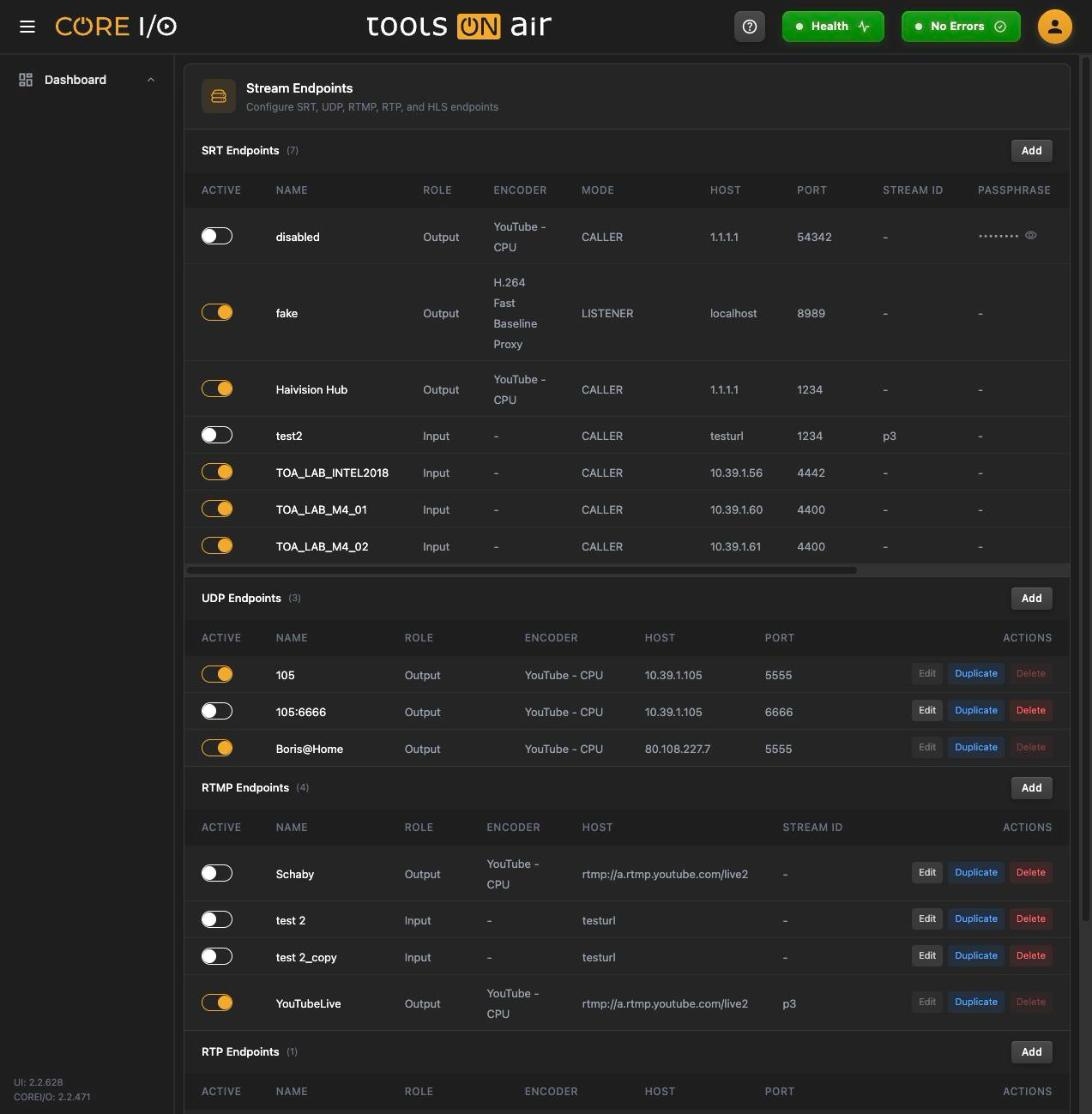
The Stream Endpoints page
Layout
The page has five sections stacked top to bottom, each with a count and its own Add button: SRT Endpoints, UDP Endpoints, RTMP Endpoints, RTP Endpoints and HLS Endpoints. Every section is a table with an Active switch in the first column and Edit, Duplicate and Delete in the last. An empty section reads, for example, "No SRT endpoints".
Adding an endpoint
- Click Add in the section for the required endpoint type. An inline row opens with the Name field selected.
- Complete the fields described below, then click Create or press Enter in the Name field. Press Escape or click Cancel to discard the row.
New endpoints are inactive. An empty name displays "Name is required." A name already used by any endpoint type displays "<type> endpoint name unavailable." A toast confirms the new endpoint, for example, "SRT endpoint added."
SRT
In the table a stored passphrase is shown as dots. The eye button (Show passphrase / Hide passphrase) reveals it and, once revealed, a copy button (Copy passphrase) puts it on the clipboard ("Passphrase copied.").
| Column | What it does |
|---|---|
| Name | Unique across all endpoints. |
| Role | Input (the flow receives this stream) or Output (the flow sends to it). |
| Encoder | Only for the Output role: the encoder preset used to encode the stream (see Encoders). |
| Mode | CALLER or LISTENER. |
| Host | Host name or IP address. |
| Port | Digits only. |
| Stream ID | Optional SRT stream id. |
| Passphrase | Optional encryption passphrase, entered hidden. |
| URI Params | Extra SRT URI parameters; spaces and ? are removed as you type. |
UDP and RTP
UDP and RTP endpoints use a host and port. Output endpoints also select an encoder preset.
| Column | What it does |
|---|---|
| Name | Unique across all endpoints. |
| Role | Input or Output. |
| Encoder | Output role only: the encoder preset. |
| Host | Host name or IP address. |
| Port | Digits only. |
RTMP
RTMP endpoints identify the server and stream by Host and Stream ID. Output endpoints also select an encoder preset.
| Column | What it does |
|---|---|
| Name | Unique across all endpoints. |
| Role | Input or Output. |
| Encoder | Output role only: the encoder preset. |
| Host | The RTMP server host or URL. |
| Stream ID | The stream key or id on that server. |
HLS
An HLS endpoint is always an input and stores the playlist URL.
| Column | What it does |
|---|---|
| Role | Always Input. |
| URL | The playlist URL. Stored URLs starting with http:// or https:// are rendered as a link that opens in a new tab. |
Activating an endpoint
The Active switch enables or disables the endpoint. The Record Viewer's endpoint dialogs list active endpoints only. While an endpoint is active its Edit and Delete buttons are disabled; switch it off to change or remove it.
Editing, duplicating and deleting
Edit changes the row to input fields. Click Save to store the changes or Cancel to discard them. A successful save displays "<type> endpoint updated." A name used by another endpoint is rejected with "<type> endpoint name unavailable."
Duplicate creates an inactive copy named <name>_copy. Further copies use <name>_copy(2), <name>_copy(3), and so on.
Delete changes the buttons to Confirm and Cancel. Confirming removes the endpoint and displays "<type> endpoint deleted."
Where endpoints are used
Flows: the Streaming Endpoint field of SRT, UDP, RTP and HLS input nodes and of SRT, UDP, RTP and RTMP output nodes lists the endpoints of that type. See Flows.
Record Viewer: on a flow with an SRT or UDP input the settings menu has an SRT Endpoint or UDP Endpoint entry. It opens Update SRT Endpoint - (or UDP) with a Select SRT Endpoint dropdown of the active endpoints; DONE applies the choice. New expands a form to create an endpoint on the spot and assign it with CREATE AND UPDATE:
SRT: Name, Connection Mode (CALLER or LISTENER), IP Address, Port, Stream ID, Passphrase.
UDP: Name, IP Address, Port.
The name is checked against the server while you type ("Checking availability...", then "Name is unavailable" or "Name is required"); the port must have at least four digits ("Please enter at least 4 digits."). Endpoints created here start inactive.
With several Record Viewers selected the dialog updates all of them and shows "Mixed" when their endpoints differ; if the selected widgets use different endpoint types it explains that a simultaneous change is not possible.
A flow with an HLS input gets an HLS Endpoint entry that lists the active HLS endpoints directly.
See Record Viewer.
Good to know
Names are unique across all five types, not per type.
The Role list comes from the server. The Mode list on this page offers CALLER and LISTENER.
Endpoints created from a Record Viewer start inactive as well; activate them here.