
We highly recommend keeping the Multi viewer window and the Channel window as a single window and not separating them using drag and drop. Separating the interfaces can cause issues and removes the preview from one of the user interfaces.
Just Live Pro User Interface Overview
The Just Control application provides tabs that allow you to access all open Just Live Pro and Just Play Pro user interfaces, as well as the Multi viewer interface with a single mouse click.
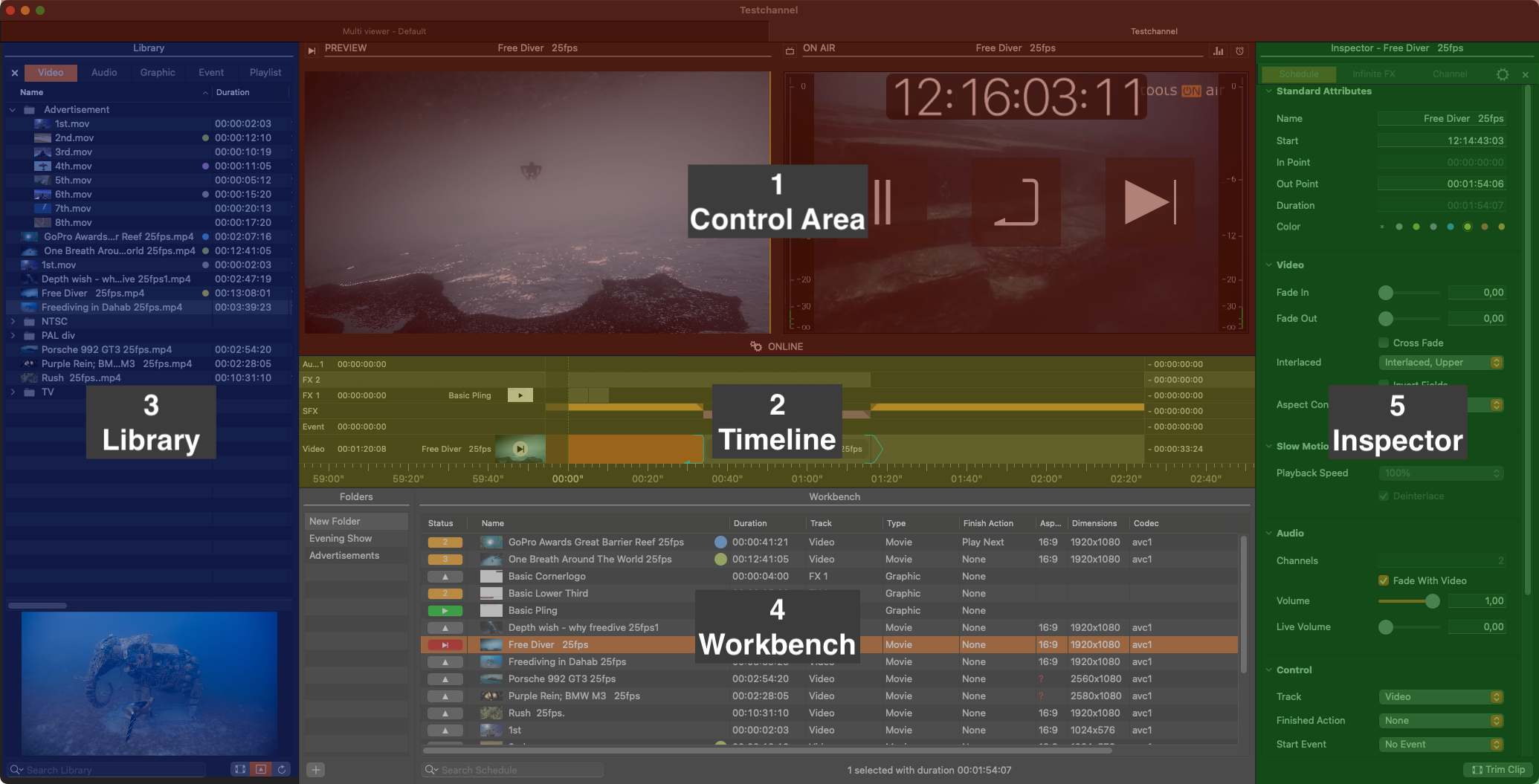
Control Area:
Preview View (left): Preview the selected Video/Graphic element.
On Air View (right): Shows the current On Air output, depending on the settings in the Just Live Pro preferences.
Status of the on air engine: Shows the status of the channel and the Just Out engine buffer with a “traffic light” system. The YELLOW (🟡) light indicates a warning, whereas the RED (🔴) light indicates that something requires your immediate attention.
Timeline: Shows all Videos, audio files, Graphic elements, and Events loaded or already playing out (including the element names, the elapsed/remaining time info, and the Layers' Play buttons). The visibility of the final output is defined from top to bottom.
Library: Divided into five tabs, the Library shows Videos, Audio, Graphic elements, Events and saved Playlists. Related metadata will also be shown (if available). There's also a search field and a preview at the bottom.
Workbench: This is the place where all the media is collected for the final playout. Folders can help you to organize and manage complex shows.
Inspector: You can modify channel related settings and attributes of one or multiple selected elements. The multiple selection of several items of the same kind is supported.
The proxy Preview in the On Air window shows a compressed image with a reduced frame rate. In addition, the Preview can stop for a moment if the communication is interrupted, even when the real output is fine. This means that the Preview is not meant to replace a broadcast monitor for the final check of the master playout.