
- General Notes
- Installation Notes
- Version 2026.2 Changes - Just Live Pro & Just Play Pro
- Version 2026.1 Changes - Just Live Pro & Just Play Pro
- Version 2026.1 Changes - Just Live Pro only
- Version 2026.0 Changes - Just Live Pro & Just Play Pro
- Version 2026.0 Changes - Just Live Pro only
- Version 2026.0 Changes - Just Play Pro only
This document describes all new features which have been added since v.2025.x. Please read What’s New Playout v.2025.x for more information about previous releases.
General Notes
Version 2026.x of our playout solutions will support macOS Sequoia (15.x) and macOS Tahoe (26.4.x and higher) on Apple silicon-based Mac minis, Mac Studios and Mac Pros.
If you are using AJA video devices, please update your drivers to version 17.1.3 (or 18.x in case you are using v.2026.1). Customers using video devices from Blackmagic Design should use the latest driver version 16.x . When using an ATEM device, please update to version 10.2.1 of the ATEM Switcher Software for improved stability, performance, and compatibility.
Installation Notes
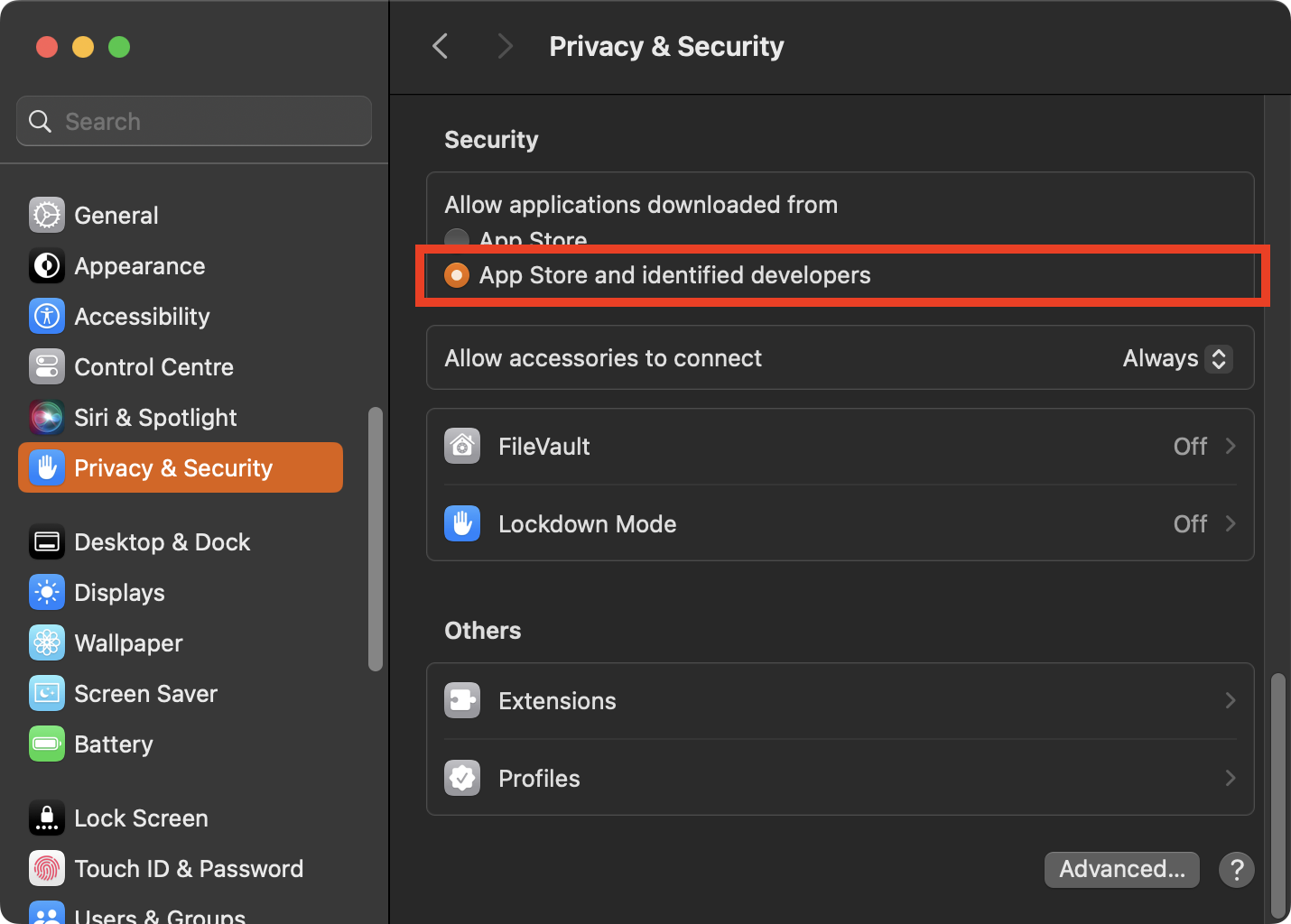
Before installing any ToolsOnAir application for macOS, open the “System Preferences” application and verify that the “Privacy & Security” setting is properly configured, as shown below. If required, you may revert the setting after the installation has succeeded.
Version 2026.2 Changes - Just Live Pro & Just Play Pro
- More control over SRT and UDP audio: When configuring an SRT or UDP output, three new controls let you select stereo or mono output, AAC or LPCM audio, and the required number of channels.
- Custom NDI stream names: When a channel uses NDI output, you can now enter a separate name for the NDI stream. This is useful when the stream name should differ from the channel name, and it also prevents NDI naming conflicts when a primary and backup Just Out application run on the same Mac for the same channel.
- Faster configuration and log handling: The configuration panel is more responsive, and the redesigned Logs & Profiles workflow improves handling on long-running systems.
- Improved ATEM Fairlight audio events: ATEM events now use the correct audio balance (pan) values on devices equipped with a Fairlight audio mixer, including ATEM Constellation and Television Studio models.
- Stability and performance: This release includes additional bug fixes and speed improvements. See the Release Notes page for complete build-by-build details.
Version 2026.1 Changes - Just Live Pro & Just Play Pro
Several bug fixes and speed improvements. Please refer to the Release Notes document inside the Just Playout folder for more information.
Updated the AJA drivers to version 18.0. If you are using an AJA device, please update your system to this version before installing or using this release.
Enabled RGBA output for UHD formats for Fill+Key output on supported devices/streams.
Version 2026.1 Changes - Just Live Pro only
Added a new “Start Preview Of Selected Item” to Just Live Pro’s scheduling tab’s “View” menu with the “Cmd-Shift-P” keyboard shortcut. If an item is selected in the workbench and therefore loading in the preview, use this menu item or keyboard shortcut to start playing the preview.
Version 2026.0 Changes - Just Live Pro & Just Play Pro
Multi playout engine support on a single Mac: After installation, the “/Applications/Just Playout” folder now contains three additional applications, “Just Out 2", “Just Out 3” and “Just Out 4". Together with “Just Out”, these applications allow you to run up to four (4) independent Just Out engines simultaneously on a single system, enabling efficient multi-channel playout.
In addition, when configuring a new system, the Setup Wizard also includes a new configuration option that lets you quickly deploy either a single-channel system or a multi-channel system with two (2), three (3), or four (4) channels.
Multi-Viewer improvements: The multi-viewer layout has undergone a substantial transformation to maximize control room utility. Previously inactive viewer slots can now be populated with customizable information widgets, including clocks, countdowns, timers, stopwatches, images, web pages, primary and redundant engine output, and live input preview. This functionality transforms the multi-viewer into a versatile operational dashboard, serving simultaneously as a confidence monitor and a central hub for channel-related information.
Realtime Preview Overlay of Closed Captions: The “Audio Monitor” multi-viewer inspector group has been renamed “Preview Monitor” and now has an additional checkbox to enable monitoring of closed captioning. When enabled, if the output signal (or if the live input is currently on-air, the input signal) includes CEA608/708 or OP-47 VANC captioning, the live preview will overlay the captions. Additionally, there is a “Show Captions” menu item in the “View” menu in the scheduling tab for each channel to turn the overlay on/off.
Improved Visibility Options: Video and SimpleFX layers have a clickable “visibility” button in the timeline as was previously already the case for FX layers. Clicking on the button toggles the visibility on and off, or, in addition, there is a new “Toggle Visible Layers” menu in the “View” menu with menu items for the individual layers. Finally, these menu items have keyboard shortcuts allowing quick toggling of layer visibility using the keyboard.
Instant Emergency Broadcast switch to Live: If the engine is configured for live input, hiding the video layer automatically shows the live input. This can be used as an “emergency broadcast” or “breaking news” feature, allowing instant switching from the current schedule to live input and back.
Improved NDI Support: The update to NDI 6.3.x, delivers improved performance and stability for NDI-based playout environments.
Additional Improvements: In addition, this new release includes a wide range of reliability enhancements, bug fixes, and performance improvements across format changes, diagnostics, memory handling, and overall channel stability.
Version 2026.0 Changes - Just Live Pro only
New Clear, Load And Play - Selected Item Double Click Action: The view menu in the scheduling tab has 4 additional menu items: “Load Selected Item”, “Load And Cue Selected Item”, “Load And Play Selected Item” and “Clear, Load And Play Selected Item”. These correspond to the “double-click” options available in the App settings, but they are now always accessible via the menu or keyboard shortcut. In combination with the cursor keys, these actions allow for quick keyboard-only operation.
Version 2026.0 Changes - Just Play Pro only
New Jump to … Functionality: The live preview viewer in Just Play’s scheduling tab now has 3 action buttons. In addition to the existing “jump to next” button, the new buttons allow you to start playing any selected item in the current playlist immediately. One button moves the selected item in the playlist to make it the next item, and then plays it immediately. The other button deletes all items in the playlist between the currently playing item and the selected item, making the selected item the next item in the playlist, and then plays it immediately.