
By default, an Element is played “as is” and no other Element is affected by this. But occasionally, it can be useful to execute an Event at the same time the playout of a Video starts or ends. Sometimes known as a Secondary Event, Start/End Events can be executed while or after playing Videos. To be able to add an Event to a Video as a Start or End Event, the Video – as well as the Event – must be loaded to the Workbench first.
Assigning an Event as a Start/End Action
Make sure the Video and Event are inside the Workbench.
Select the Video and select a Start/End Event in the Inspector.
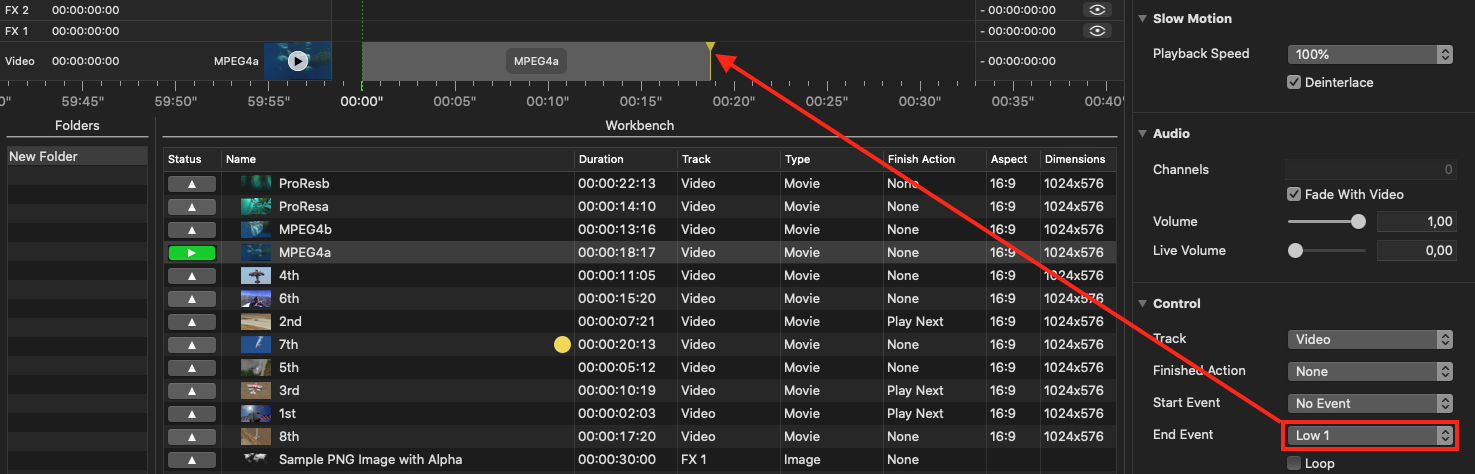
Playing a Video with a Start/End Event
Start the Playout of the Video.
The Start/End Event will automatically be triggered at the beginning or end of the Video.
A Lock symbol will be shown in front of an element which is used as a Start/End Event. To be able to remove this Event from the Workbench, it has to be removed from the Main element before.