
- Customers using TeamViewer to access the Mac running Just Out
- SMB issues using some versions of macOS
- Communication Issues resulting from an improper Network Configuration
- Using different TOA software versions
- Duplicate Names in Repository Folders
- Using Channels with different Frame Rates in a single just:connect or just:control
- Jump to next can lead to missing timed events (Rules)
- Broken Video Files
Customers using TeamViewer to access the Mac running Just Out
If you’re planning to use TeamViewer to access a machine running Just Out, please verify that you have the following settings deactivated in the “Remote control” panel of the TeamViewer client (the machine you use to connect to the machine running Just Out).
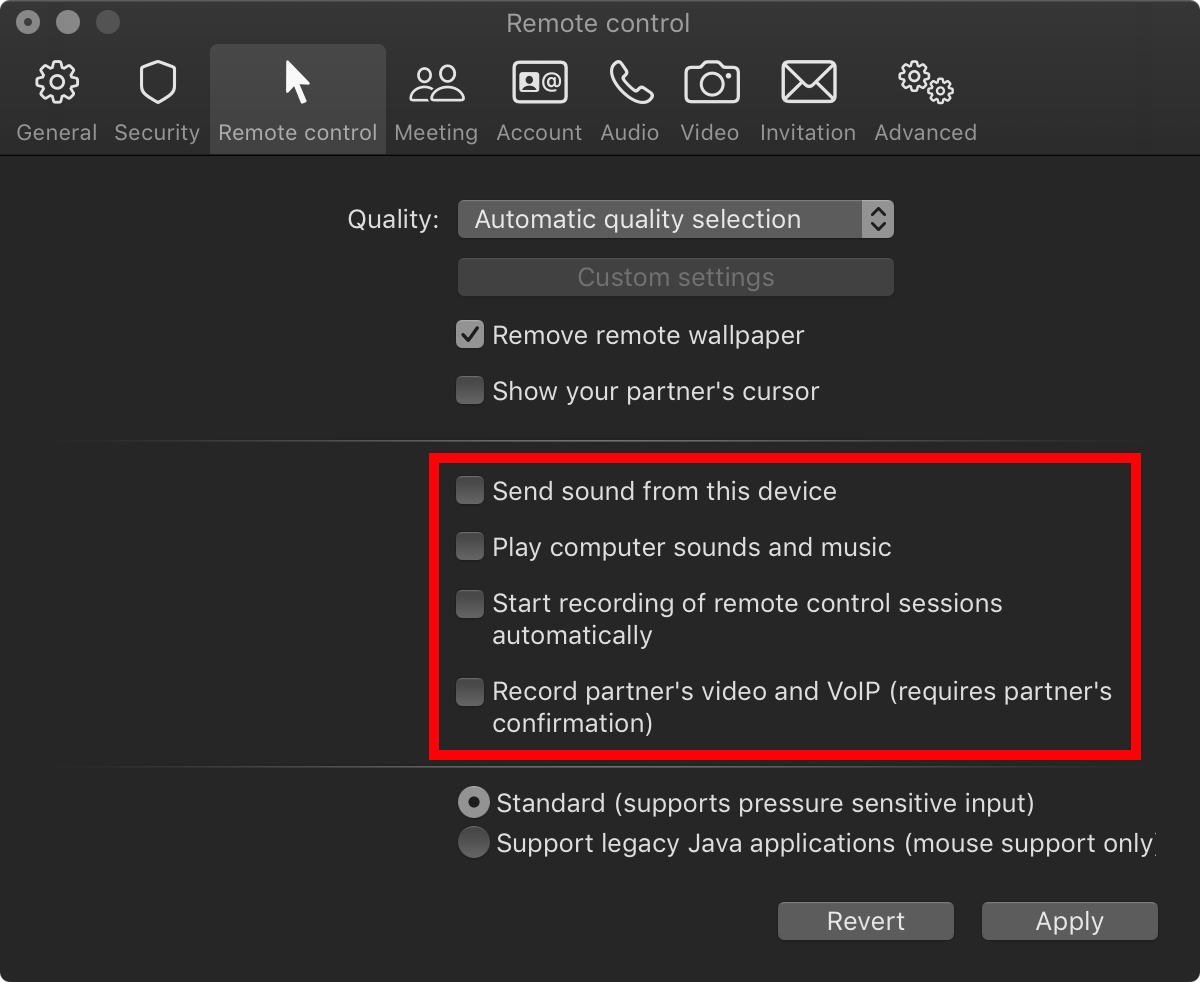
Failing to do so will switch the audio output away from the video device at the same time you connect to the machine running Just Out using TeamViewer.
SMB issues using some versions of macOS
Some versions of macOS behave very slowly while connected to a shared storage using SMB. Please execute the following Apple Terminal commands on all Macs running ToolsOnAir playout software to disable SMB 1, which can improve the behavior:
echo "[default]" | sudo tee -a /etc/nsmb.conf
echo "protocol_vers_map=6" | sudo tee -a /etc/nsmb.conf
Communication Issues resulting from an improper Network Configuration
Make sure that the IP configuration of all machines is set up correctly. A non-reachable DNS server (or Google DNS server) for example may prevent the proper execution of the Just Out engine. In case you experience network problems very often, usage of the network-based workflow where the engine and the UI are used on different machines is impossible. In such a case, we recommend running the Just Out, Just Connect, and Just Control applications on the same machine and configuring the network to use the local mode by defining “127.0.0.1” as the default IP address. Additionally, we strongly recommend avoiding network architectures based on wireless (Wi-Fi) technology.
Using different TOA software versions
Do not mix different Tools On Air Playout software versions as long as you are not told to do so by the ToolsOnAir support team. This means that every Just Out, Just Connect, and Just Control appication should be at the same version level. For example, you should never use a newer Just Out and Just Connect version with an older version of Just Control and vice versa.Audio issues related to the On Air audio preview
If the Just Out and Just Control applications are running on the same Mac and the channel is configured to use the virtual device engine, turning on the On Air audio preview generates a second audio output which is slightly delayed. There are some issues after pressing the “Jump To Next” button in such a situation. We recommend turning the On Air audio preview off while using an engine with a virtual device engine assigned to it running on the same machine.
Duplicate Names in Repository Folders
Defining two Repository folders that contain a file with the same name creates a problem. Just Out will find the file in the Repository folder that is defined first, even if you dragged the file from the Repository folder defined second in Just Control. Example: in the “Just Control Configuration → Repositories” panel, you can define two folders, one called “SD” and the other “HD” (in that order). In the Just Control application, you drag a video clip called “movie.mov” from the “HD” folder into the timeline. If there is also a video clip called “movie.mov” in the “SD” folder, the Just Out engine will play the file from the “SD” folder because it is defined before the “HD” folder.
Using Channels with different Frame Rates in a single just:connect or just:control
Make sure that all ingest and playout channels administrated using a single Just Connect (or operated in a single Just Control) are all using the same frame rate. Mixing of channels using different frame rates in a single Just Connect or Just Control is currently not supported. Please contact the Tools On Air HelpDesk for possible setups including channels with different frame rates.
Jump to next can lead to missing timed events (Rules)
Pressing jump to next right before a timed event (Rule) has to be executed, can cause the event to be skipped as well.
Broken Video Files
It is important to make sure that all files that should be played out are supported and can be played out. An unlicensed (trial) version of the Just Out playout engine running on another Mac can be used to test new files. Please verify that the machines are absolutely the same (hardware and software). Ensure that all movies are available if reference movies should be used. Trying to play out faulty or unsupported movies can harm the final output and even crash the engine.
Please take a look at the → ToolsOnAir Helpdesk Knowledgebase for frequently asked questions.